Is Dictation Faster Than Typing? What the Research Says

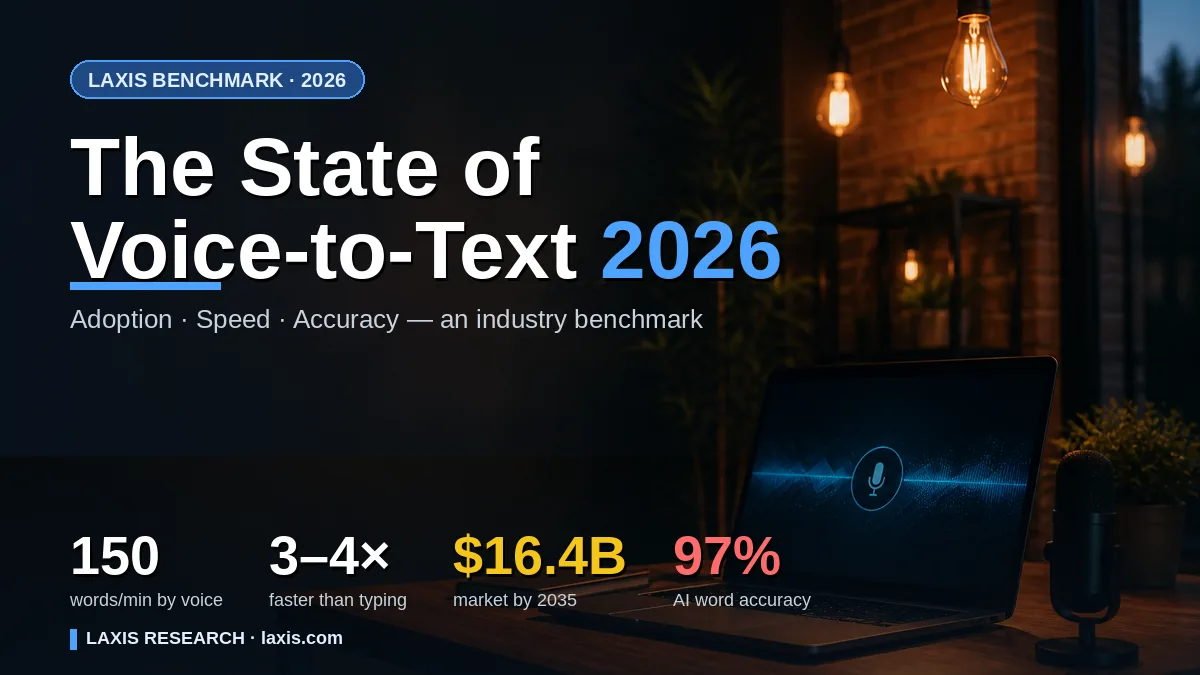
Is dictation faster than typing? For getting words onto a screen, usually yes. In a much-cited lab study, people speaking into a phone entered English text at 153 words per minute, against 52 on the phone's keyboard: nearly three times as fast. But those people were reading short phrases aloud in a quiet room. Whether dictation is faster for you depends on what you write, how quickly you already type and how much fixing the words need afterwards.
Below: the original numbers, what each study did and didn't measure, where the keyboard still wins, and a five-minute test for your own answer.
Dictation vs typing speed: the measured numbers
Plenty of articles answer this with round figures and no source. Here's what the primary research found. One convention first: the typing and phone studies count every five characters, spaces included, as one word; the conversation study counted actual spoken words.
| What was measured | Average speed | Study | The task |
|---|---|---|---|
| Typing on a computer keyboard | 51.56 WPM (SD 20.2) | Dhakal, Feit, Kristensson and Oulasvirta, CHI 2018; 168,000 volunteers | Copying sentences in an online typing test |
| Typing on a phone | 36.2 WPM | Palin, Feit, Kim, Kristensson and Oulasvirta, MobileHCI 2019; 37,370 volunteers | Copying sentences in a browser-based test |
| Phone keyboard in a lab | 52 WPM English, 43 WPM Mandarin | Ruan, Wobbrock, Liou, Ng and Landay, 2017; 48 students | Copying short phrases on iPhone 6 Plus |
| Speech recognition on the same phone | 153 WPM English, 123 WPM Mandarin | Ruan et al., same participants | Speaking the same phrases, errors fixed |
| Telephone conversation | 196 WPM overall, 236 WPM without pauses | Yuan, Liberman and Cieri, Interspeech 2006 | 2,438 recorded calls, mostly between strangers |
Typing studies: Aalto University and partners. Phone study: Stanford, the University of Washington and Baidu. Conversation study: University of Pennsylvania.
Three things stand out. Typists vary enormously: the Aalto desktop data has a standard deviation of about 20 WPM around its average. Phones were slower: the Aalto mobile volunteers averaged 36.2 WPM, about 70% of the desktop volunteers' 51.56. And conversation outpaces all of it, though the figure depends on how you count: 196 WPM across whole calls, 236 once silences are removed, 164 when each speaker's turns are timed separately, with single calls anywhere from 111 to 291.
None of these is dictation in the everyday sense. The keyboard studies timed copying, the conversation study timed chatting, and the phone study timed people reading phrases aloud. That last one is where the "three times faster" line comes from, so it deserves a closer look.
What the Stanford phone study tested, and what it didn't
The paper is "Comparing Speech and Keyboard Text Entry for Short Messages in Two Languages on Touchscreen Phones" by Sherry Ruan, Jacob Wobbrock, Kenny Liou, Andrew Ng and James Landay, first posted in 2016 and published in December 2017 in the Proceedings of the ACM on Interactive, Mobile, Wearable and Ubiquitous Technologies. Baidu's Deep Speech 2 did the recognizing, on a server off-site.
Forty-eight university students took part, 24 native speakers of American English and 24 of Mandarin, seated in a quiet meeting room and sharing one iPhone 6 Plus. After ten practice phrases, each copied 50 test phrases by keyboard and 50 by voice, fixing errors as they went. The phrases, from a standard research set, averaged under 30 characters and had no punctuation. The authors were explicit about what that design measures: each method's "upper-bound performance" under ideal conditions. They chose copying over composing on purpose, because composing brings in thinking time and word choice, which are hard to measure.
Two details rarely make the headlines. Speech speeds varied far more than typing speeds, with a standard deviation of about 98 WPM for English speech against 17 for the keyboard. And the clock ran through every pause. Only 39% of speech-entry time was spent speaking; 31.5% was users' own hesitation, such as waiting a second or two before talking or lingering before pressing Done, and about 23% was the recognizer finishing its work. The authors expected that hesitation to shrink as people got used to speaking to their phones.
Fixing mistakes is where the gap narrows
The study also shows what corrections cost. The recognizer's first attempt, before anyone touched it, worked out at 179 WPM in English, 3.42 times the keyboard. Fixing its mistakes brought that down to 153. Participants spent 8.5% of their speech-entry time correcting, and for 86% of that time they used the keyboard rather than their voice. They rated the keyboard easier for corrections and speech easier for producing text.
Accuracy cut both ways. In English, speech produced fewer errors during entry, a corrected error rate of 3.93% against 4.72% for the keyboard, but left slightly more in the finished text: 0.55% of characters against 0.35%. The authors offer two possible reasons. People may be less willing to switch to the keyboard to fix things, and typists see each word appear as they type, so they spot mistakes sooner. Either way, it's an argument for reading dictated text before it goes out.
Correction used to be far worse. Ruan's team cites a 1999 study of continuous dictation software by Clare-Marie Karat and colleagues in which users managed 13.6 WPM transcribing by voice, against 32.5 WPM transcribing with keyboard and mouse, and just 7.8 WPM composing by voice. Part of the trouble was correcting by voice: the correction commands themselves were misheard and had to be corrected. Recognizers have improved enormously since, but the lesson survives. Correct with your hands, not your voice.
Your starting speed matters too. A 2025 preprint that timed more than 1,000 clinicians and health workers at 60+ hospitals in 15+ low- and middle-income countries found a median keyboard speed of 21.4 WPM against a median of 93 WPM for dictation. Treat it with care: it's a preprint, it measured clinical documentation, and, as the paper discloses, it was funded by Intron Health, which employs the first author. The direction makes sense all the same. At 25 WPM on the keyboard, almost any decent recognizer will beat you; at 90, the margin is much thinner.
If cleanup is what eats your dictation gains, try the Laxis Voice Keyboard: its Polish setting, on by default on every plan, strips fillers and self-corrections before the text is pasted.
Where speaking pulls ahead, and where typing still wins
Speech has the clearest edge on a phone, where typing averaged 36 WPM across 37,370 people; for messages you already know how to say, such as replies, recaps and notes after a call; for anyone who types slowly; and for people whose hands hurt, where the question is barely about speed at all. Our guide to dictation for dyslexia, RSI and ADHD covers that side.
The keyboard keeps its edge in more places than the headline suggests:
- Editing. Moving a clause, deleting three words mid-paragraph or selecting text is quicker with keys and a pointer, which is what Ruan's participants chose.
- Code, symbols and exact strings. Brackets, casing, file paths and regular expressions are slow to say and easy to mishear. Developers who dictate tend to talk through the prose around the code, as our piece on dictation for coding explains.
- Passwords and numbers. Some fields shouldn't be spoken anyway, and some voice keyboards won't take them; the Laxis keyboard on iPhone disables its microphone in password and number fields.
- Very short replies. "Thanks!" or "On my way" takes a second to tap. Starting a dictation, waiting and checking costs more than the words.
- Shared spaces. In an open office or on a train, dictation broadcasts your draft; a review cited in the Ruan paper found users worried about privacy and confidentiality when speaking to devices around others.
- Thinking on the page. The computer scientist Ben Shneiderman argued that speaking draws on the same cognitive and memory resources as problem solving, which can hold back composing. Authors who dictate whole books work around it with outlines, as our guide to dictation for writers describes.
How AI cleanup changes the math
The typing and dictation speeds above mostly come from copying tidy phrases. Real dictation means composing, and spoken composition is messy: "um", restarts, "no wait, make that Thursday", a list that comes out as one long sentence. Classic dictation typed every bit of it, and the cleanup came out of your time later, usually at the keyboard.
AI cleanup moves that work. Instead of transcribing word for word, newer dictation tools rewrite the transcript into what you meant before it reaches the page: fillers gone, the self-correction resolved, the list formatted as a list. Your job shifts from editing to reading. Ruan's copying task had no fillers to remove, so it can't say how much this saves; composing adds exactly the editing that cleanup targets.
Cleanup has costs too. The rewrite takes processing time, it needs a connection when it runs in the cloud, and every rewrite is a chance for meaning to drift: a hedge dropped, a deliberate repetition merged, a name "corrected". So read before you send, especially anything with numbers or commitments. We haven't found a published study that measures how much AI cleanup changes end-to-end writing speed, so treat any speed multiplier in dictation marketing, ours included, as a claim rather than a measurement, and time yourself instead.
Here's how it works in the Laxis Voice Keyboard, available for Mac, Windows, iPhone and Android, which types wherever your cursor is. Polish has two styles: Standard writes what you meant, removing fillers, resolving self-corrections and formatting dictated lists, while Keep spoken words only cleans up noise and keeps your wording. Turn Polish off for the fastest, word-for-word result. Processing happens in the cloud, and dictation shares one monthly pool of minutes with meeting recordings, 300 on the free Basic plan and 2,000 on Premium.
Make dictation faster in practice
- Know your first sentence before you press the key; hesitation ate nearly a third of the clock in Ruan's study.
- Speak in whole sentences, then pause, and don't watch the words arrive.
- Fix mistakes with the keyboard and mouse, not by voice.
- Add names and acronyms to your tool's dictionary once, and learn the few punctuation and formatting commands it supports.
A five-minute test to find your own number
Published averages describe thousands of strangers. This test describes you, on your own writing, fixing included.
- Pick two real messages you need to send today, similar in length and difficulty, such as two email replies of a paragraph each.
- Type the first one. Start a stopwatch when you begin and stop it when the message is ready to send, typos fixed.
- Dictate the second. Same rule: the clock runs until it's sendable, including every correction, by voice or by hand.
- Work out words per minute. Paste each message into a word counter that shows characters with spaces, divide by five, then divide by the minutes it took. A 600-character email finished in two and a half minutes is 120 words in 2.5 minutes, or 48 WPM.
- Swap and repeat tomorrow. Type the kind of message you dictated and vice versa, which evens out the luck of which one was easier. Ruan's team did the equivalent by varying which method each participant tried first.
Run it where you actually work, with the microphone you'd really use; a quiet room flatters dictation the way it flattered Ruan's participants. If the dictated version keeps losing on accuracy rather than speed, our guide to why voice to text gets words wrong works through microphones, rooms and vocabulary. Laxis on a computer shows a words-per-minute figure for your dictation, but it can't see the edits you make afterwards in your email, so the stopwatch number is the fairer match against typing.
Reading your result
- Dictation wins clearly: use it for first drafts and replies, and keep the keyboard for edits.
- Roughly a tie: dictation can still be worth it on your phone, or if typing tires your hands.
- Typing wins: check the microphone and the room, give it a week, since hesitation may shrink as speaking to a device becomes a habit, then test again.
Writing in a second language? The same press-and-speak habit works for translated dictation too, as we explain in our guide to choosing a voice to text translator.
Time yourself with a keyboard that tidies as you talk. Run the five-minute test with the Laxis Voice Keyboard on Mac, Windows, iPhone or Android, with Polish clearing out fillers and false starts. 14-day Premium trial, no credit card. Get the Laxis Voice Keyboard
The bottom line
The research answer is yes, by a wide margin, on a phone, in a quiet room, with short phrases. The practical answer is whatever your stopwatch says, and for most people it changes with the task: talk to get the words down, type to shape them. So the more useful question isn't which one is faster overall. It's which parts of your writing you're happy to hand to your voice.
Frequently asked questions
Is dictation faster than typing?
For producing text, dictation is usually faster than typing, especially on a phone. In the lab study by Ruan and colleagues, English speech input reached 153 words per minute against 52 on a phone keyboard, about 2.9 times faster. The gap shrinks once editing, thinking time and background noise come in, so time yourself on real messages before deciding.
How fast do people talk compared to how fast they type?
People talk much faster than they type. In a 2006 study by Yuan, Liberman and Cieri, recorded English phone calls ran at about 196 words per minute across whole calls, 236 with silences removed, and about 164 when each speaker's turns were timed separately. Large Aalto University studies of online typing-test volunteers put average typing at about 52 words per minute on a computer and 36 on a phone, both measured with copy-typing tests.
What is the average typing speed?
Among volunteers who took online typing tests in two large Aalto University studies, the average was about 52 words per minute on a computer keyboard and 36 on a phone. The desktop study of 168,000 volunteers measured 51.56 WPM, with a standard deviation of about 20, and the mobile study of 37,370 volunteers measured 36.2 WPM. Both timed people copying sentences rather than composing.
Is voice typing more accurate than typing?
Voice typing can make fewer errors while you enter text but leave slightly more in the finished result. In the English trials run by Ruan and colleagues, speech had a corrected error rate of 3.93% against 4.72% for the keyboard, yet 0.55% of characters stayed wrong in the final text against 0.35%. Proofread dictated text, especially names and numbers.
Why does dictation feel slower than typing?
Dictation often feels slower because of the overhead around speaking, not the speaking itself. In the Stanford-led phone study, only 39% of speech-entry time was spent talking, 31.5% went on users hesitating before or after speaking, and about 23% on the recognizer catching up. Knowing your first sentence before you start and fixing errors with the keyboard both help.
Does AI cleanup make dictation faster?
AI cleanup can save editing time by removing fillers, resolving self-corrections and formatting lists before the text appears. We have not found a published study measuring its effect on overall writing speed, and the rewrite adds processing time and a chance for meaning to drift. Time a few real messages with cleanup on and off to see which is faster for you.