Siri Recap on Apple Watch: Release Date, Privacy, Consent

Siri Recap is Apple's answer to the meeting you walk out of and can't quite reconstruct: switch it on, and Apple Watch Series 12 or Ultra 4 listens to your conversations and later hands you a short summary of what was discussed. As of October 28, 2026, it isn't available yet. Apple says Siri Recap and its companion feature, Live Rewind, will reach a beta later this year, with English first, and neither is part of watchOS 27.2, which Apple released on October 26.
This explainer draws on Apple's Audio Intelligence support article (last updated September 30), its September 9 announcement, and reporting from TechCrunch, The Next Web and 9to5Mac. Apple Watch is a platform we build on, not a rival, so the aim is a fair account of Apple's design, the pushback it has drawn, and how a summary compares with an AI note taker such as our own Laxis for Apple Watch.
Where things stand, October 28, 2026
- Announced September 9 for Apple Watch Series 12 and Ultra 4.
- Apple's status line promises a beta "later this year," English first. No date yet.
- Not in watchOS 27.2 (October 26), whose release notes focus on Siri AI and mention neither feature.
- Needs Series 12 or Ultra 4, paired with iPhone 16 or later (iPhone 16e excluded), with Apple Intelligence and Siri AI (Beta).
- Not initially available in the EU, and not available to anyone under 13.
- 9to5Mac reported on October 28 that it expects both features in watchOS 27.3; Apple hasn't said so.
What Siri Recap does, in Apple's words
Apple describes Siri Recap as a feature that "ambiently takes notes on your conversations throughout your day" and turns them into high-level summaries you can use later "to jog your memory." After a conversation, Apple Intelligence generates a title and key points, which land in the Recaps tab of the new Siri app. TechCrunch's launch story gave the kind of moments Apple has in mind: takeaways from a team meeting, or what was said at a parent-teacher conference.
You decide when it listens. Siri Recap stays off until you turn it on in the Watch app on iPhone, and you can give it a schedule based on time or location (Apple's examples are "only at work" and "never at night") or switch it on and off by hand. Either way, Control Center has a toggle.
The summaries are yours to manage. You can view, edit and delete them in the Siri app, and deleting one removes it from every synced device. You can export them to apps such as Notes and Journal. Saved summaries sync through iCloud with end-to-end encryption if you use two-factor authentication and a device passcode, and anything you don't save or export deletes itself after 7 days.
Just as telling is what Apple left out. There's no transcript and no audio. Summaries don't attribute anything to a speaker, though a name can appear if someone said it aloud. Apple says recaps are designed to omit sensitive details such as financial data, government-assigned identifiers and authentication data, while warning that automated filtering may not catch everything. Its footnote is candid about accuracy too: recaps "may be incomplete or inaccurate," and "when accuracy matters, confirm important information with the people involved or another reliable source."
Live Rewind: a 15-second safety net
Live Rewind is the simpler of the two. Double-press the Digital Crown and the watch puts the previous 15 seconds of speech on screen as a text snippet, so you can catch a name, a number or a phrase you missed. You can ask Siri about the snippet or save it to the Siri app; otherwise it disappears about 30 seconds after the display dims. It doesn't keep transcribing in the background, and its speech recognition runs on your watch and iPhone. Saving a snippet or asking Siri about it sends it to Private Cloud Compute.
Apple built in signals for the people around you. Each time Live Rewind runs, a chime plays from the watch speaker, even on silent or with headphones connected, and a full-display animation and microphone indicator appear. Requiring a deliberate double-press is part of the design too, and Apple says these signals exist to let people nearby know the feature is in use. For now, Apple puts the switch in the Watch app on iPhone under Siri, then Live Rewind, with more details promised at launch.
How Apple keeps the audio out of reach
The engineering is the most interesting part of the announcement. Both features run through the Secure Exclave on the S11 chip, a hardware-isolated compartment that processes sound apart from the rest of the system. Apple says raw audio there can't be reached by the operating system, apps, the wearer or Apple, and is deleted once processed. So is Apple Watch Series 12 recording your conversations? Not as audio, by Apple's account: "There is no recording to share, forward, or produce if requested by any party, because no recording exists."
Siri Recap takes a longer route than Live Rewind. According to Apple, the watch encrypts detected audio and sends it to the Secure Exclave on your paired iPhone, where it's decrypted, transcribed and condensed. The condensed text, designed to run under half the length of the transcript with filler words and hints of tone removed, goes to Private Cloud Compute with some context, and an encrypted summary comes back. The Next Web, reading Apple's privacy overview, reported that the context can include calendar data, Now Playing information and broad location labels such as home or work, and that a lightweight model on the chip decides when a conversation is happening at all.
It's an unusually detailed privacy design, and it deserves credit. (If the difference between on-device and cloud processing is new to you, our primer on on-device versus cloud transcription covers it.) It also explains the trade you accept: because the words are thrown away, there's no transcript to check a recap against. Apple's press release adds that features relying on server-side models, Siri Recap and Live Rewind included, are subject to daily usage limits.
For a personal memory aid, that's a fair bargain. For work, it leaves a gap. A summary you can't verify isn't something you can quote to a client, settle a disagreement with, or hand to a colleague who missed the meeting.
If you need the words themselves, download Laxis and keep the conversation as a transcript you can search and share.
The consent question Apple can't engineer away
Having no audio file doesn't settle whether you need permission, and the debate started on launch day. In an analysis for TechCrunch, Sarah Perez argued that features able to transcribe recent speech and summarize ambient conversation raise consent questions that are ethical and legal at once. She noted that recorder maker Plaud tells customers to obtain legally required consent, that text-only notes might be harder to authenticate in court, and that a double-press on a crown is a subtler gesture than lifting a phone.
Then the lawyers weighed in. Bloomberg's Natalie Lung put the question to attorneys in California, Massachusetts, Pennsylvania and Washington, states that generally require every party's consent, and none was convinced Apple's protections would shield a wearer, according to The Next Web's account of her reporting. Boston defense attorney Joe Simons said the issue hasn't been litigated in Massachusetts. Pennsylvania's Phil Lauer called the technology close to legal, while granting that the opposite argument can be made. Seattle attorney Mark Blair was blunter: a wearer has to announce that the watch is recording, he said, and otherwise it's a criminal violation. Colin Zick of Foley Hoag advised treating the features as an interception and asking permission first, and the EFF's Adam Schwartz said people nearby have no practical way to consent or decline.
Apple's position is that the features don't record at all. Per The Next Web, the company rejects that framing, saying people have long used phones and wearables to take notes, and that with no recording in existence there's nothing to share or hand over. Its support page adds a gentler line: "consider those around you where conversations might be private or sensitive." One asymmetry is worth knowing. Live Rewind chimes every time, but Apple's support page describes no equivalent signal while Siri Recap runs, which The Next Web says Apple's privacy overview ties to the absence of raw audio.
So what should a Series 12 owner do? This isn't legal advice, but the habits are simple: tell people when Siri Recap is on, use the schedule so it runs only where you mean it to, and switch it off from Control Center for private or sensitive conversations. Consent rules differ by state and country; our guide to phone call recording laws by state is a useful start.
Siri Recap vs an AI note taker
They solve different problems. Siri Recap is a memory aid that forgets on purpose; an AI note taker exists to keep a record. Apple is also stepping into a crowded field here, which our comparison of wearable AI recorders and meeting assistants maps out, and our guide to Apple Watch transcription covers getting actual text from watch audio. The table uses Apple's published details and our own app as the note-taker example.
| Siri Recap | Live Rewind | AI note taker (Laxis for Apple Watch) | |
|---|---|---|---|
| What you get | A title and key points per conversation | The last 15 seconds as text | Full transcript, AI notes and action items |
| Audio kept | No | No | Yes, the recording uploads to your Laxis account |
| Transcript | No | A 15-second snippet only | Yes, with speakers |
| Speaker attribution | No, by design | No | Yes |
| How it starts | Ambient, on a schedule or a toggle | A double-press of the Digital Crown | One tap, your next meeting, the watch face, or Double Tap on newer models |
| How long it lasts | Deleted after 7 days unless saved or exported | Gone about 30 seconds after the display dims unless saved | Stays in your account; Basic shows 30 days, older notes are archived |
| Sharing | Export to Notes, Journal and other apps | Save to the Siri app | Share notes with your team, next to your online meetings |
| Devices | Series 12 or Ultra 4 with iPhone 16 or later, not 16e | Same as Siri Recap | Any Apple Watch on watchOS 10 or later, plus the Laxis iPhone app |
| Availability | Beta later this year, English first | Beta later this year, English first | Available now |
| Processing | Secure Exclave, then Private Cloud Compute | On watch and iPhone; Private Cloud Compute if you save a snippet or ask Siri | Cloud |
| Cost | Included | Included | Free Basic, 300 minutes a month; Ask Laxis needs Premium |
Apple details from support.apple.com/148354 and the September 9 announcement; Laxis details from the Laxis for Apple Watch page and its App Store listing, as of October 28, 2026.
Siri Recap wins on effort and footprint: nothing to start, no audio anywhere, end-to-end encrypted summaries, and no extra cost on a Series 12. A note taker wins whenever you need the actual words: who committed to what, the exact figure a client quoted, a transcript you can pass to someone who wasn't in the room. Plenty of Series 12 owners will want both: Siri Recap for the day's chatter, and a recorder, used with everyone's agreement, for meetings that count.
When a full record is what you need
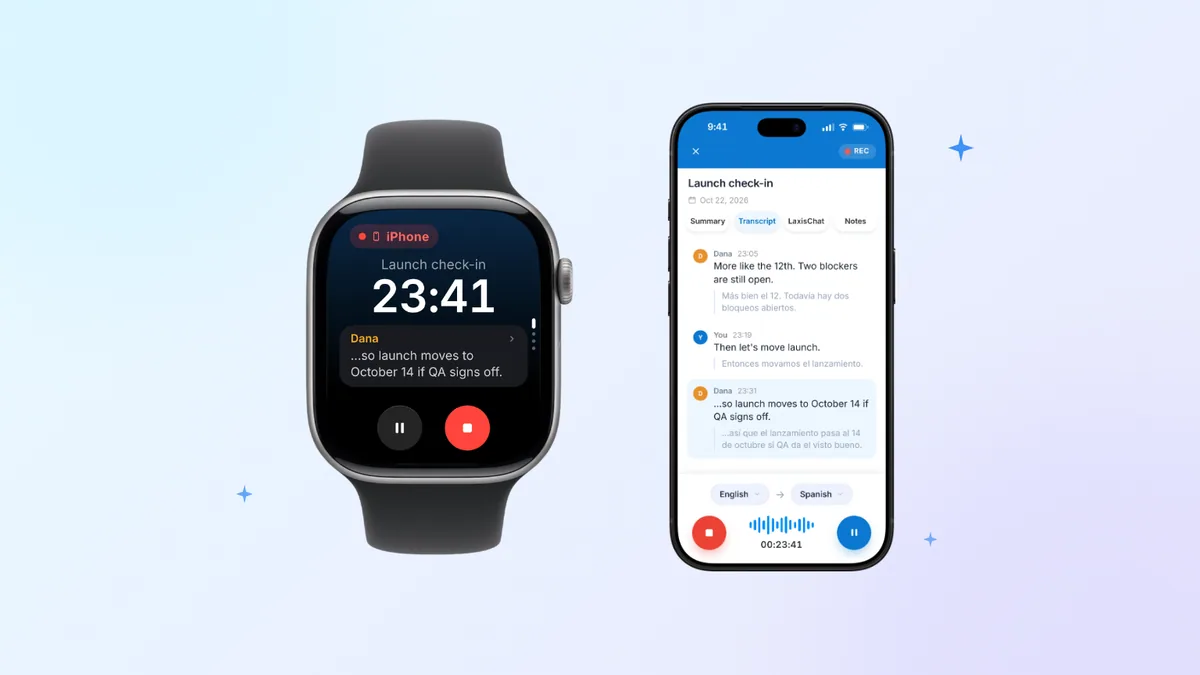
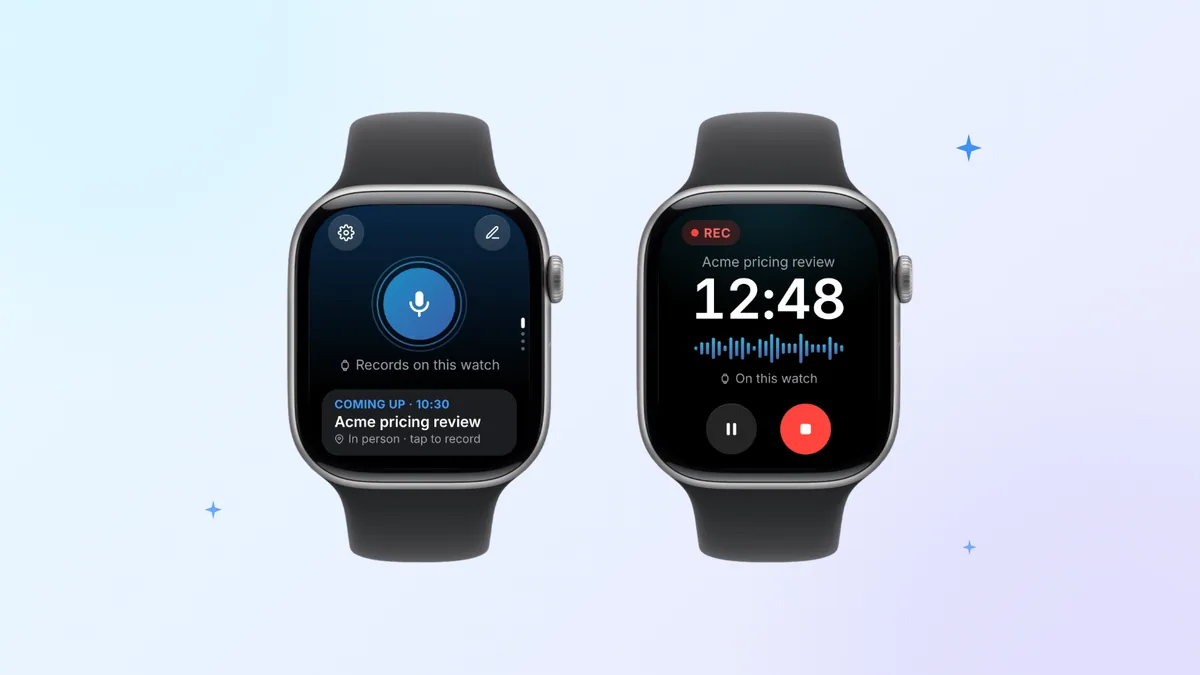
Some conversations need more than the gist: a client meeting where commitments get made, an interview you'll quote later, a team decision someone will question next month. Laxis for Apple Watch is designed for exactly those moments. It's part of the free Laxis iPhone app: sign in on your phone, install the watch app through the Watch app, then tap once to record with the watch's microphone. It needs nothing newer than watchOS 10, and your iPhone can stay on your desk, because the recording waits on the watch and uploads through your iPhone when it's close, or over Wi-Fi or a cellular connection otherwise.
After the last word, Laxis turns the recording into a speaker-labeled transcript, AI notes and action items, and pings you when they're ready. Start from your next meeting on the watch and the notes are filed under it. And where Live Rewind gives you the last 15 seconds, Laxis lets you tap the flag on a moment you'll want later; each mark becomes a jump point in the full transcript. Everything lands in the same workspace as your Zoom, Teams and Google Meet notes, where you can share it, and Tasks on the wrist lets you tick off action items as you go.
The trade-offs, plainly. Laxis processes audio in the cloud, so it needs a connection, and watch recordings are transcribed after they upload rather than live. You'll need the Laxis iPhone app for setup and sign-in; the watch can't handle that part by itself. Asking Laxis questions on the watch uses AI Chat, a Premium feature, and the free Basic plan stops at 300 minutes a month and 45 minutes per recording. Laxis doesn't notify the people you're recording, so telling them, and getting consent where the law requires it, is up to you.
See the screens on the Laxis for Apple Watch page, or compare it with six other wrist recorders in our Apple Watch recorder roundup.
If Siri Recap isn't showing up
Most people looking for a missing Siri Recap are simply early: as of October 28, it hasn't been released. Once the beta arrives, check these in order:
- The watch: Series 12 or Ultra 4. Earlier models don't get it.
- The phone: iPhone 16 or later, except iPhone 16e, with Apple Intelligence and Siri AI (Beta) turned on.
- Language and region: English first. Siri AI has to be active (you join a waitlist in Siri settings on iPhone, and your device and Siri languages must match), and on watchOS it isn't initially available in the EU.
- Age: not available under 13; on a Child Account under 18, a parent or guardian has to turn it on.
Then look in the Watch app on iPhone, where Apple says you switch Siri Recap on and set its schedule.
Need the transcript, not just the gist? Install Laxis on iPhone (it's a free download), then turn on its watch app from the Watch app. Any watch on watchOS 10 or later will do. Every new account gets the 14-day Premium trial, no credit card. Keep the whole conversation
The bottom line
Apple has built a memory aid that forgets on purpose, and for much of daily conversation that's exactly right. The open questions are social and legal rather than technical: whether the people across the table are comfortable, and whether courts treat ambient summarizing as listening in. Until those settle, a simple test works for any conversation. Do you want to remember it, or to be able to show what was said? The first is Siri Recap's job. The second needs a record, and everyone's agreement to make one.
Frequently asked questions
When is Siri Recap coming out?
Apple hasn't given a date. As of October 28, 2026, its support page says Siri Recap and Live Rewind will arrive as a beta later this year, with English first, and neither feature is part of watchOS 27.2, which Apple released on October 26. Apple says more details will be available at launch.
Which Apple Watch models will get Siri Recap and Live Rewind?
Only Apple Watch Series 12 and Ultra 4. The watch has to be paired with iPhone 16 or later, not including iPhone 16e, with Apple Intelligence and Siri AI (Beta) turned on. Apple says the features start in English, won't initially be available in the EU and aren't available to users under 13.
Does Apple Watch Series 12 record your conversations?
Not as audio, according to Apple. Siri Recap and Live Rewind handle sound inside hardware-isolated Secure Exclaves on the watch and your paired iPhone, then delete it, so there is no audio file to play back or share. Siri Recap keeps a short text summary for 7 days unless you save it, and Live Rewind shows only the last 15 seconds as text.
What does Live Rewind do on Apple Watch?
Live Rewind turns the most recent 15 seconds of conversation into an on-screen text snippet when you press the Digital Crown twice, so you can catch a name or a phrase you missed. A chime plays even on silent, and the screen shows an animation and a microphone indicator. The snippet disappears about 30 seconds after the display dims unless you save it.
How do I turn on Siri Recap, and why is it missing?
If Siri Recap is missing, it is most likely because it hasn't been released yet. When it arrives, Apple says you turn it on in the Watch app on iPhone, set a schedule by time or place, and toggle it from Control Center. It also needs a Series 12 or Ultra 4, a supported iPhone and Siri AI.
Is Siri Recap the same as an AI note taker?
No. Siri Recap produces brief, high-level summaries with, by design, no transcript, no audio and no speaker names, so it works as a memory aid rather than a record. An AI note taker such as Laxis for Apple Watch keeps the recording and returns a full speaker-labeled transcript, AI notes and action items you can search and share.