Best Apple Watch Voice Recorder App: 7 Options for 2026
Your best Apple Watch voice recorder app depends on one question: what should happen after you tap stop? If the honest answer is "nothing, I just want the audio," the free recorder already on your wrist will do. If it's "a transcript, a summary and the action items, filed with the rest of my meetings," you need something else, and the seven apps below split along exactly that line.
The short verdict
- Choose Apple Voice Memos if you want free, simple audio that shows up on your iPhone and Mac through iCloud.
- Choose Just Press Record if you'd rather pay $6.99 once than subscribe, and want unlimited recording time with transcripts in 30+ languages.
- Choose Whisper Memos if you capture ideas and to-dos and want each one back as clean text and a summary in your inbox.
- Choose Voicenotes if you want to record on the wrist and later ask an AI about anything you've said, starting free.
- Choose Granola if your team already takes meeting notes in Granola and you want the watch to start the same kind of note.
- Choose Circleback if you want a free plan with no meeting cap and speaker-labeled transcripts for in-person meetings.
- Choose Laxis if your wrist recordings are meetings that belong next to your Zoom, Teams and Google Meet notes, with transcripts, action items and your next meeting one tap away (watchOS 10 or later).
Try Laxis free 14-day Premium trial, no credit card. Start on iPhone, then put Laxis on your watch through the Watch app.
Every app here lists an Apple Watch app on the App Store as of October 28, 2026, and all seven record with the watch's own microphone rather than acting only as a remote for your phone. We didn't run lab tests; the details come from each developer's listing, pricing page and help center, checked that day. One disclosure: Laxis makes one of the seven, and its limits are spelled out as plainly as everyone else's. Want a phone recorder instead? See our roundup of voice memo apps for iPhone and Android or the comparison of AI note taker apps for phones.
A wrist recorder is only as good as what happens after you stop
Recording is the easy part: all seven start with a tap and keep going while your phone sits in a bag across the room. The differences show up afterward.
- Where the audio travels. Voice Memos uses iCloud; the rest hand files to their iPhone apps or upload once there's a connection.
- Who turns it into text. Voice Memos and Just Press Record transcribe on your iPhone; the AI apps use cloud services, which is where the summaries come from.
- What comes back. Audio, a transcript, a summary, action items, speaker labels, or a note filed under a meeting.
- What the free plan caps. Minutes a month or a week, minutes per recording, or days of history.
- Which watchOS you need. Anything from watchOS 5.1 for Voice Memos to watchOS 11 for Granola.
For every built-in way to capture sound, see how to record audio on Apple Watch; and for getting words out of a recording, read our guide to Apple Watch transcription options.
The seven apps, one by one
1. Apple Voice Memos: free, already installed, audio first
Apple Watch: watchOS 5.1 or later · Price: free · Transcripts: on iPhone 12 or later, in ten languages
Apple's recorder is the baseline. Open Voice Memos on the watch, tap record, tap stop; Apple's user guide says watch recordings show up on their own on any iPhone, iPad or Mac that shares your Apple Account, gathered in a Watch Recordings list. The App Store page lists Enhance Recording for background noise, Skip Silence, folders and automatic transcripts.
Those transcripts carry fine print: Apple says they need an iPhone 12 or later and cover ten languages, and the listing mentions no summaries, speaker labels or action items. Fine for a reminder, thin for a meeting. Here's how to transcribe voice memos, plus our fix for Apple Watch voice memos not syncing.
Strengths: free, no extra account, and it runs on far older watches than anything else here. Limits: transcripts only on iPhone 12 or later, no AI notes, nothing that ties a recording to a meeting.
2. Just Press Record: pay once, record as long as you like
Apple Watch: watchOS 10.6 or later · Price: $6.99 one-time · Transcripts: on iPhone, 30+ languages
Open Planet Software's recorder has had a watch app since 2015. The listing says its watch app keeps working with your phone out of range, starts from a complication, has no time limit, and passes recordings to your iPhone for transcription and iCloud syncing. Updates have since added recording through AirPods from the watch, on watchOS 11 or later.
Transcripts cover more than 30 languages regardless of your device language, and both audio and text are editable. Its privacy label reads "Data Not Collected."
Strengths: one payment, Family Sharing, no time cap. Limits: no summaries or action items, and the listing warns that transcription needs clean audio close to the microphone.
3. Whisper Memos: talk now, read it in your inbox
Apple Watch: watchOS 10.6 or later · Price: free download; $9.99 a month or $69.99 a year on its pricing page · Recordings: up to 90 minutes
Whisper Memos is built for people who think out loud. The watch app records on its own, sits on your watch face as a complication, and works offline, syncing once you're back online. Each memo is transcribed by a model you choose, including OpenAI Whisper and ElevenLabs Scribe, in 50+ languages, then summarized and emailed to you; custom prompts add tabs such as an action-item list. A Meeting Mode added in August labels speakers, and the redesigned watch app supports it. Zapier and an MCP server connect memos to other tools.
Strengths: a summary in your inbox for every memo, a choice of models, flexible integrations. Limits: it's a paid app at heart (the developer told one App Store reviewer it has only ever offered a paid option), and another reviewer reports watch memos sometimes upload late.
4. Voicenotes: record now, ask questions later
Apple Watch: watchOS 10.6 or later · Free Basic: 100 transcription minutes a week, 30-day history · Pro: $9 per user a month on its pricing page
Voicenotes treats the watch as a capture button for a searchable memory. Its watch page describes one tap on the complication to record, offline recording that syncs later, and Ask AI on the wrist for pulling details out of your notes. The help center caps watch recordings at 60 minutes.
Basic is free with unlimited recordings, 100 transcription minutes a week (shared across meetings, memos and dictation) and 30 days of history. Pro lifts the cap and adds live transcription and integrations for $9 per user a month on the pricing page, while the App Store lists a $14.99 monthly plan. It also runs on Android and Wear OS, and says recordings never train AI models.
Strengths: Ask AI on the watch, cross-platform, a usable free tier. Limits: 60 minutes per watch recording, and one long meeting can eat most of a week's free minutes.
5. Granola: the laptop notepad, started from your wrist
Apple Watch: watchOS 11 or later (iPhone app needs iOS 18) · Free Basic: 30 days of history · Business: $14 per user a month
Granola added its watch app in July. Tap an upcoming meeting or start a new note; the recording is captured on the watch, passed to your iPhone and turned into notes on your phone and desktop. The help center lists each hand-off state, from Saved to Complete, so you can see where a note is stuck. The watch can record offline; it only needs a connection to sync and generate notes.
One design choice stands out: a chime plays when a recording starts and ends and the watch taps your wrist, "so people nearby are aware and can ask not to be recorded." The chime can't be switched off, and the setup steps include "Let people know you are using Granola." An interrupted recording can be synced but not resumed.
Basic is free with 30 days of history, speaker tagging and AI chat; Business is $14 per user a month. The pricing page says audio is deleted after transcription, so expect notes, not a replay.
Strengths: an audible signal built in, a clear sync pipeline. Limits: watches that can't run watchOS 11 won't see the app at all.
6. Circleback: a free plan without a meeting cap
Apple Watch: watchOS 10.0 or later · Free: unlimited meetings, 30-day history · Pro: $15 per user a month on annual billing
Circleback shipped its watch app on June 29 with a short promise: record an in-person meeting from your wrist, no phone required. Tap the complication, and when the meeting ends, notes, action items and a transcript land in Circleback. The listing adds automatic speaker identification, answers across meetings with cited sources, over 100 languages, and integrations from Slack to Salesforce.
The free plan is the headline: unlimited meetings, AI notes, Ask Circleback, speaker-labeled transcripts and the watch app, with 30 days of history. Pro is $15 per user a month on annual billing for unlimited history and full automations. Circleback says it doesn't train models on customer data, and HIPAA compliance comes with its Enterprise plan.
Strengths: no meeting cap on the free plan, speaker labels at no cost. Limits: free history stops at 30 days, and the watch app covers in-person meetings, leaving online calls to its bot or desktop app.
7. Laxis for Apple Watch: wrist recordings filed with the rest of your meetings
Apple Watch: watchOS 10 or later · Free Basic: 300 min a month, 45-minute cap per recording · Premium: $15.99 monthly or $9.99 a month on yearly billing
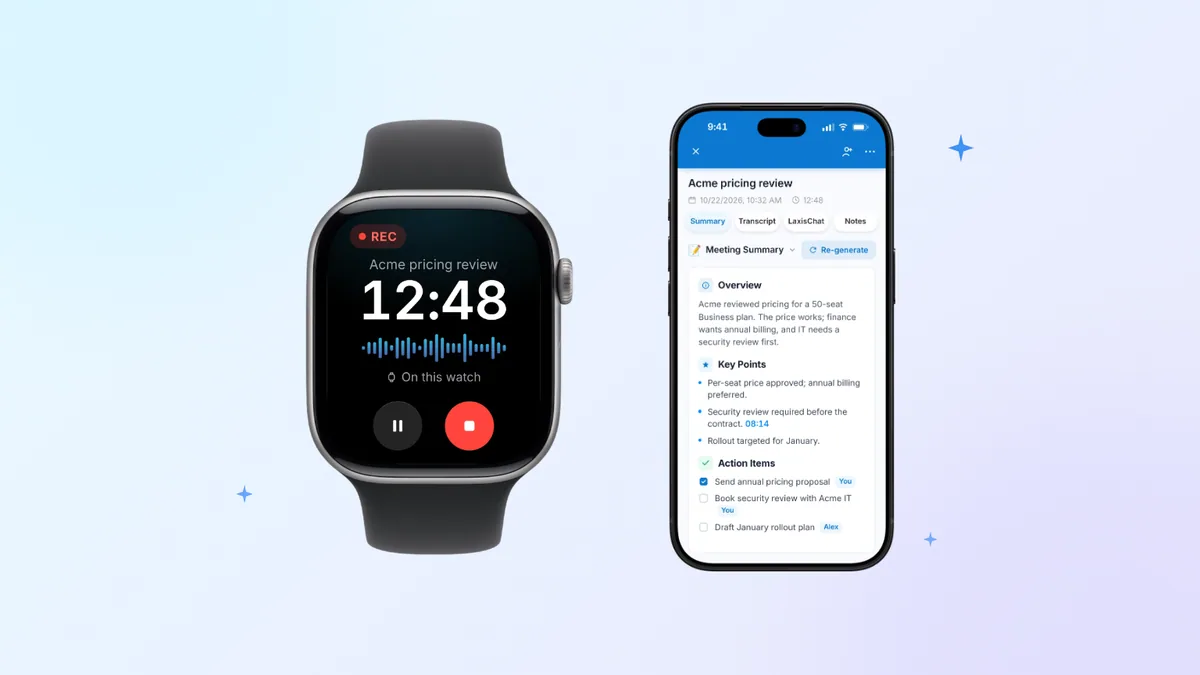
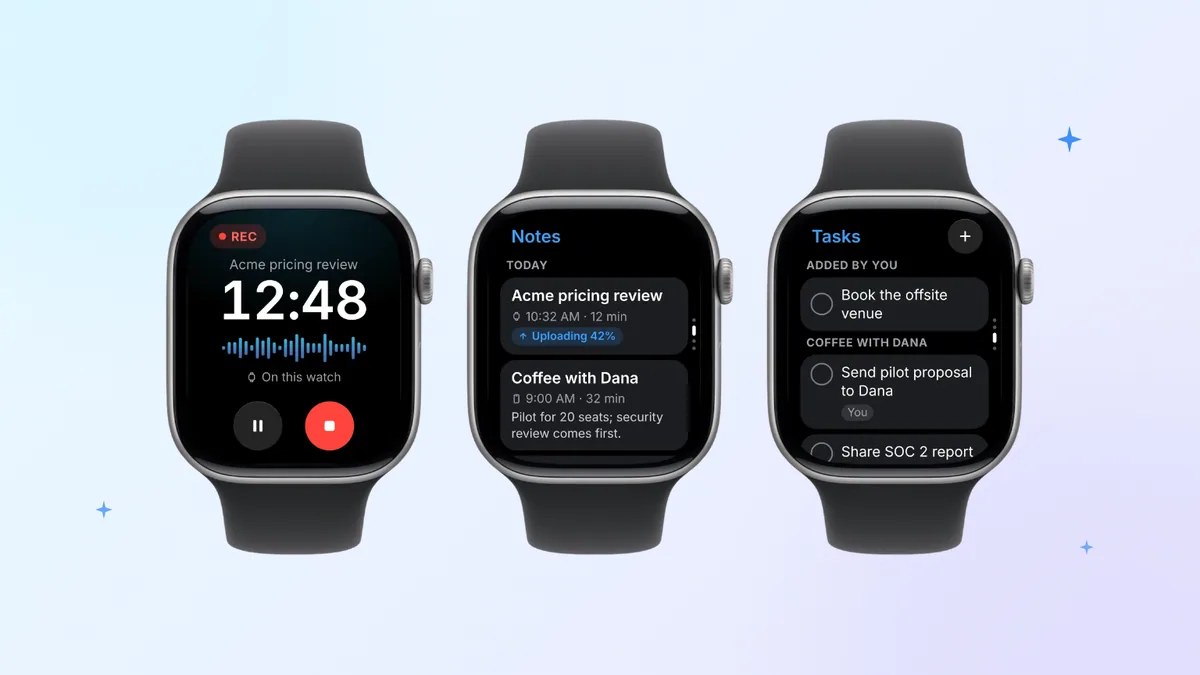
You get Laxis for Apple Watch through the free Laxis app for iPhone, which the App Store lists as Laxis: AI Notes & Dictation. Install it, sign in, and choose Laxis in the Watch app to put it on your wrist. Tap once and the watch's built-in microphone starts recording, with a tap on your wrist to confirm; a watch-face complication puts that tap next to the time, and Double Tap also starts a recording on Series 9 or later, Ultra 2 or later and SE 3 (watchOS 11 or later). Lower your wrist and keep talking; the screen dims, the recording carries on, and pause or stop is one tap away. The watch also shows your next meeting, and tapping it files the notes under that meeting.
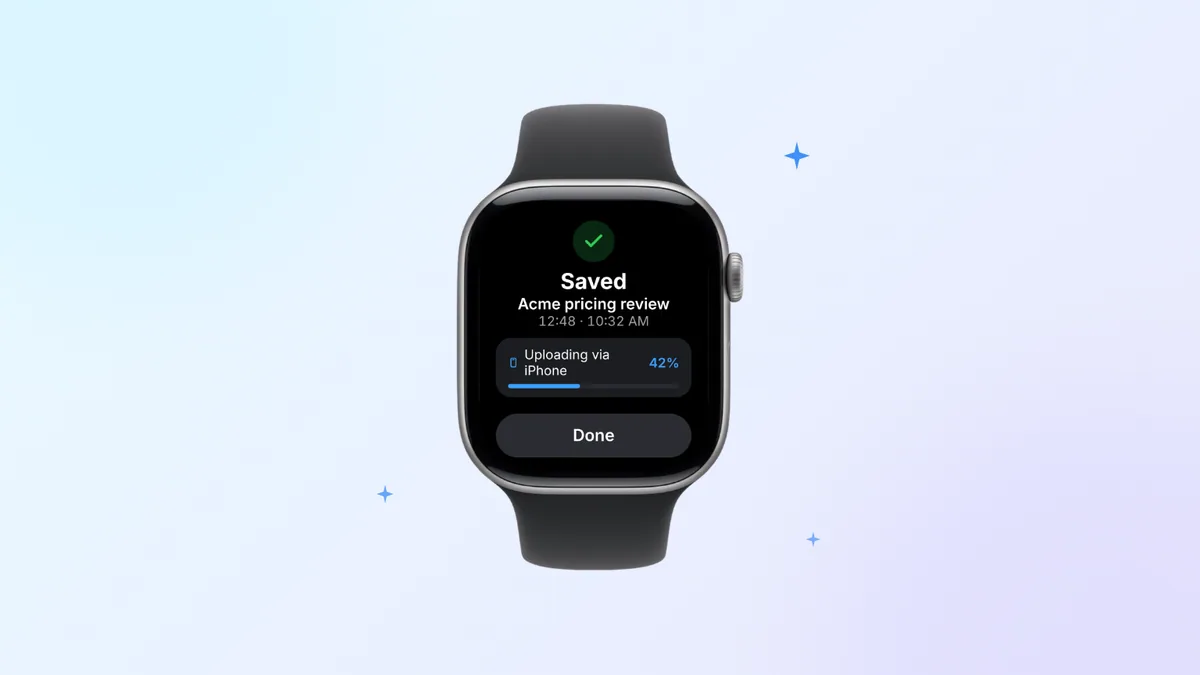
Your iPhone can stay behind. The audio waits on the watch and syncs by itself, going up through your iPhone whenever the phone is close by, or over Wi-Fi or a cellular connection when it isn't. Flags you tap mid-meeting become jump points in the transcript. Once the recording uploads, Laxis produces a transcript with speakers, AI notes and a list of action items, then sends a notification, all in the same workspace as your online meeting notes in Laxis. If a recording is running on iPhone, the watch doubles as its remote control, showing elapsed time and the live transcript. The wrist also carries Notes, Tasks (action items you can tick off or add by voice), Ask Laxis, which can read its answer aloud, and Jot, which tidies a spoken thought into today's Daily Note and works offline.
The limits, plainly. It's new, with far less track record than the older apps here. Processing happens in the cloud, so transcription starts once a watch recording has uploaded; nothing is transcribed live on the wrist. You need the Laxis iPhone app to set it up and sign in. Ask Laxis uses AI Chat, a Premium feature. Basic's 300 minutes a month are shared with dictation and live translation, and each recording stops and saves at 45 minutes (2 hours on Premium, 4 on Business), with a wrist tap when 10 and then 5 minutes remain. Laxis isn't HIPAA compliant and doesn't sign BAAs. The watch app's own screens are in English and Simplified Chinese only.
Screens and setup details are on the Laxis for Apple Watch page.
The hand-off is where wrist recordings go missing
A watch recording isn't useful until it reaches the place you'll read it, and every app has a step in between: iCloud for Voice Memos, their iPhone apps for Just Press Record and Granola, a connection for Whisper Memos, Voicenotes and Circleback, and your nearby iPhone or a Wi-Fi or cellular connection for Laxis. Until that step finishes, your wrist may hold the sole copy.
That's the real pain point, more than battery or microphone quality. A meeting that never syncs is gone, and one that syncs as raw audio is an hour you'll probably never replay. A few habits help with any app:
- Keep your iPhone in Bluetooth range for a minute after a long recording, and open the companion app if the transfer stalls.
- Check the watch app's status before you leave. Granola, for one, lists unsent notes under Waiting to sync.
- Never unpair or erase a watch that's still holding unsynced recordings.
- Keep your wrist on the table, near whoever is talking. A wrist in your lap mostly hears your sleeve.
If those recordings are meetings you'll have to act on, download Laxis and let the transcript, notes and action items arrive without a manual export.
All seven side by side
| Voice Memos | Just Press Record | Whisper Memos | Voicenotes | Granola | Circleback | Laxis | |
|---|---|---|---|---|---|---|---|
| Records with iPhone elsewhere | Yes, syncs via iCloud | Yes, transfers to iPhone later | Yes, syncs when online | Yes, syncs when connected | Yes, sent to iPhone afterward | Yes, per its listing | Yes, uploads via iPhone, or over Wi-Fi or cellular |
| What text you get | Transcript on iPhone 12 or later, 10 languages | Transcript on iPhone, 30+ languages | Transcript, speakers in Meeting Mode | Transcript after upload | Notes with speaker tagging | Speaker-labeled transcript | Transcript with speakers |
| AI notes and action items | Not in the listing | No | Summary per memo, custom prompts | Summaries, Ask AI | AI notes, chat | Notes, action items, Ask Circleback | AI notes, action items, Ask Laxis (Premium) |
| Longest recording | Not stated | No limit | 90 minutes | 60 minutes on the watch | Not stated | Not stated | 45 min Basic, 2 h Premium, 4 h Business |
| Free tier | Free app | None | Free download, paid app | 100 min a week, 30-day history | Basic, 30-day history | Unlimited meetings, 30-day history | 300 min a month, 30-day history |
| Paid from | — | $6.99 once | $9.99/mo or $69.99/yr | $9/user/mo | $14/user/mo | $15/user/mo, yearly | $9.99/mo yearly, $15.99 monthly |
| Needs | watchOS 5.1 | watchOS 10.6 | watchOS 10.6 | watchOS 10.6 | watchOS 11 | watchOS 10.0 | watchOS 10 |
From App Store listings, pricing pages and help centers, checked October 28, 2026.
Recording people from your wrist starts with telling them
A watch is the easiest recorder in the room to overlook, which is why the courtesy has to come from you. Consent rules vary: some US states require everyone in a conversation to agree, others only one participant, and other countries set their own terms. State-by-state details are in our guide to recording phone calls with consent. None of this is legal advice; when the stakes are high, ask a lawyer.
Granola's approach is a useful model: a chime and a wrist tap at the start and end, plus a setup step telling you to let people know. Laxis taps your wrist when a recording starts, but that tap is for you alone, so say it out loud. With any of these apps, mention the recording before you tap and stop if anyone objects.
How to pick, by what you actually record
- Quick thoughts and reminders: Voice Memos, or Just Press Record for more languages and no time cap.
- Ideas you want back as text: Whisper Memos for emailed summaries, Voicenotes to question your notes later.
- In-person meetings: Granola if your team already uses it, Circleback for a free plan with no meeting cap, Laxis if you want watch recordings beside your Zoom, Teams and Meet notes, with your next meeting on the wrist.
- An older watch: Voice Memos needs watchOS 5.1, Laxis and Circleback watchOS 10, Just Press Record, Whisper Memos and Voicenotes watchOS 10.6, and Granola watchOS 11.
- Free only: Voice Memos costs nothing; for AI notes, Circleback has no meeting cap, Laxis Basic gives 300 minutes a month, Voicenotes Basic 100 a week, and Granola Basic keeps 30 days of history. Our free AI note taker guide covers the desktop side.
Waiting for Siri Recap on a Series 12? It's a different kind of tool: Apple says it writes high-level summaries without keeping audio or a transcript, and it isn't out yet. Our explainer on Siri Recap and Live Rewind covers what it will and won't do.
Three candidates didn't make the cut. Otter's listing shows iPhone and iPad only, with no watch app (our full Otter.ai review covers the rest). Notta lists Apple Watch support, but we found no Notta page explaining its watch app, and its free plan transcribes only three minutes per recording. WristNote leads with recording phone calls from the wrist, has 15 ratings and hasn't been updated since December 2025.
Record on your wrist, read the notes anywhere. Download the free Laxis iPhone app, install the watch app from the Watch app on your phone, and your next in-person meeting comes back as a speaker-labeled transcript with AI notes and action items to work through. 14-day Premium trial, no credit card. Put Laxis on your wrist
The bottom line
A watch makes a capable microphone and a poor notebook; its screen is too small to read a transcript, let alone fix one. So judge these apps by the screen you'll use afterward. No screen at all? Keep Voice Memos. Your inbox or a searchable memory? Whisper Memos or Voicenotes. Wherever your team keeps its meetings? Then the watch app is only the front door, and the workspace behind it is what you're really choosing.
Frequently asked questions
Which voice recorder app is best for Apple Watch?
There's no single winner; the right Apple Watch recorder depends on what you need after you stop. Apple Voice Memos is free and fine for plain audio, Just Press Record suits people who want one payment and no time limit, and Whisper Memos or Voicenotes suit idea capture with AI summaries. For meetings, Granola, Circleback and Laxis turn wrist recordings into transcripts, notes and action items.
Which Apple Watch apps can record without iPhone nearby?
All seven apps in this roundup record with the watch's own microphone while your iPhone is somewhere else. Apple Voice Memos, Just Press Record, Whisper Memos, Voicenotes, Granola and Laxis keep the audio on the watch and sync it later, and Circleback says no phone is required, so transcripts and notes appear once the recording reaches your iPhone or the app's servers.
Is there a free Apple Watch note taking app?
Yes. Apple Voice Memos is free but records audio only, with transcripts on iPhone. Among AI note takers, Circleback's free plan includes unlimited meetings with a 30-day history, Granola Basic is free with 30 days of history, Voicenotes Basic gives 100 transcription minutes a week, and Laxis Basic gives 300 minutes a month with recordings up to 45 minutes.
Can an AI note taker on Apple Watch record meetings?
Yes, for meetings in the room. Granola, Circleback and Laxis let you start a recording from the watch, then turn it into a transcript, notes and action items once it syncs, and Laxis also puts your next meeting on the watch, so a recording started there lands in that meeting's notes. For Zoom, Teams or Google Meet calls, use the same service's desktop app or meeting bot instead.
Will Siri Recap replace an Apple Watch recorder app?
Probably not, because Siri Recap doesn't make recordings. Apple says it creates high-level summaries of conversations without storing audio, producing a transcript or attributing speakers, and unsaved summaries delete after 7 days. It's due in beta later this year, in English first, only on Apple Watch Series 12 and Ultra 4 with iPhone 16 or later, excluding iPhone 16e.
Do I need consent to record a conversation on Apple Watch?
Often, yes, because many places require everyone's consent before a conversation is recorded. Some US states and many countries need all parties to agree, while others need only one. Tell people before you tap record and stop if anyone objects; a watch is easy to overlook, which makes saying it out loud more important.