How to Use Walkie-Talkie on Apple Watch (Gone in watchOS 27)

Walkie-Talkie on Apple Watch let you hold a button, say something, and have a friend hear it straight away, wherever they were. If the app has disappeared from your wrist, nothing is broken: Apple discontinued Walkie-Talkie with watchOS 27. Here's who can still use it, how it works, how far it reaches, what it costs, why it won't connect and what to use instead, checked against Apple and the App Store on November 4, 2026.
The short answer
- Gone in watchOS 27. Installing the update removes Walkie-Talkie, and Apple says you can't download it again.
- Still works on watchOS 26 or earlier, but only between two people who both haven't updated. Series 6, 7 and 8, Apple Watch SE (2nd generation) and first-generation Apple Watch Ultra can't update to watchOS 27, so they keep it.
- Closest replacements: a FaceTime audio call for live talk; an audio clip in Messages, or a voice message in WhatsApp or LINE, for quick spoken notes.
What watchOS 27 changed
Apple's support article on Walkie-Talkie, dated September 17, 2026, now opens with this:
"With watchOS 27, Walkie-Talkie has been discontinued. After you update your Apple Watch to watchOS 27, the Walkie-Talkie app will no longer appear on your watch, and it's not available to download from the App Store. If you're using watchOS 26 or earlier, you won't be able to start a Walkie-Talkie conversation with a friend who has updated to watchOS 27."
So there's no setting to flip back and nothing to reinstall, and friends lose it in pairs: once one of you updates, that person has no app and the other can't start a conversation with them.
MacRumors reported on June 10, 2026 that the app had vanished from the app list and Control Center in the first watchOS 27 developer beta, before Apple had said anything. The support page now confirms it without giving a reason, and Walkie-Talkie is missing from Apple's watchOS 27 user guide and feature-availability page.
Which watches keep it
watchOS 27 runs on Apple Watch SE 3, Series 9 and later, and Ultra 2 and later. Series 6, 7 and 8, Apple Watch SE (2nd generation) and first-generation Apple Watch Ultra are on Apple's watchOS 26 list but not its watchOS 27 list, so Walkie-Talkie stays on them.
On a newer watch, skipping watchOS 27 keeps Walkie-Talkie, at a cost. Apple's update guide says updates bring bug fixes and security enhancements, and some iOS updates need a matching watchOS update before data such as Activity keeps syncing to your iPhone. And a watch that holds back only talks to friends who held back.
How to use Walkie-Talkie on Apple Watch (watchOS 26 or earlier)
What is Walkie-Talkie on Apple Watch? Apple's push-to-talk app, added in watchOS 5 in 2018, according to MacRumors. Apple says it works like a real walkie-talkie: press a button to talk, release it to listen. And how does Walkie-Talkie work behind that button? Not by radio. Apple requires FaceTime audio calls to work on each person's iPhone, MacRumors says it runs on FaceTime infrastructure, and you can only talk to people who have accepted your invitation.
Before you start, both of you need:
- Apple Watch Series 1 or later running watchOS 5.3 through watchOS 26.6.
- FaceTime set up on iPhone, with FaceTime audio calls working.
- A country or region where Walkie-Talkie and FaceTime are offered; Apple says neither is available everywhere.
- Check FaceTime on your iPhone. Open Settings, find FaceTime and make sure it's turned on and signed in to your Apple Account. Your friend does the same.
- Open Walkie-Talkie on Apple Watch. Press the Digital Crown and pick it from your apps.
- Invite a friend. Scroll through your contacts and tap a name to send an invitation. To add someone later, tap Add Friends. Until they accept, their card stays gray under Friends You Invited.
- Wait for them to accept. Your friend taps Always Allow in the invitation notification (it also waits in Notification Center and in the app), and their card turns yellow.
- Tap your friend, then touch and hold the Talk button and speak. If the screen says connecting, wait until it connects.
- Let go to listen. Your friend hears you right away and answers the same way. Turn the Digital Crown to change the volume.
How to turn Walkie-Talkie off, or talk with one tap
To make yourself unavailable, switch Walkie-Talkie off at the top of the app or tap its button in Control Center; if someone tries you, you get a notification asking whether you'd like to talk. Theater Mode also makes you unavailable, but Silent Mode doesn't: Apple says you'll still hear chimes and your friend's voice. Do Not Disturb follows your iPhone settings.
If holding the button is awkward, open Settings on the watch, tap Accessibility and, under Walkie-Talkie, turn on Tap to Talk; one tap starts talking and a second tap stops. To remove someone, swipe left on their name in the app and tap the delete button.
How far it reaches, and what it costs
How far does Apple Watch Walkie-Talkie work? There's no range figure, because the two watches never talk to each other directly. Apple's guide says both people need connectivity, through a Bluetooth connection to iPhone, Wi-Fi or cellular, which is why MacRumors says it worked over any distance. A friend on another continent is as reachable as one in the kitchen while both watches are online; without a connection, two watches can't reach each other even across a table.
In practice, your own connection sets the range: a watch without cellular has to stay within Bluetooth reach of its iPhone or on Wi-Fi that your iPhone has used before, while a cellular model with an active plan moves between those and the cellular network by itself, according to Apple.
Does Walkie-Talkie on Apple Watch cost money? Not on its own. It's built into watchOS 26 and earlier, and Apple lists no fee, subscription or per-message charge for it. It does use data: Apple's FaceTime page notes that data rates may apply over cellular, and a cellular Apple Watch needs its own plan with the same carrier as your iPhone.
Why Walkie-Talkie is not working
The update is now the usual culprit, so start there.
- Someone installed watchOS 27. If it was you, the app is gone. If it was your friend, Apple says you can no longer start a conversation with them.
- The invitation is still pending. A gray card under Friends You Invited means your friend hasn't tapped Always Allow.
- Your friend is unavailable. Apple says alerts reach a friend who is wearing their watch with Walkie-Talkie on, so ask about the switch, Theater Mode and Do Not Disturb.
- It's stuck on connecting. Give it a moment; both watches need a working connection through iPhone, Wi-Fi or cellular.
- FaceTime isn't ready. On iPhone, check that FaceTime is on and signed in to your Apple Account, and that your email address is selected under You Can Be Reached By FaceTime At. If FaceTime was deleted, reinstall it from the App Store and make a test call.
- Invitations won't go through. Restart Apple Watch and iPhone. Then, in Walkie-Talkie, swipe left on the contact, tap delete, tap the plus button and add the same person again.
- The app is missing on watchOS 26 or earlier. If you deleted it, Apple says you can download it again from the App Store on the watch, until you update.
What to use instead of Walkie-Talkie on Apple Watch
Nothing we could verify recreates the original: hold a button on your wrist and a friend hears you live, without picking up. Calls are live, but someone has to answer; voice messages take seconds to send, but the other person listens when they look. Choose by which half you miss.
Messages: audio clips, already on your watch
The easiest swap needs no download. In a Messages conversation, tap the Apps button, choose Audio, say your piece and tap Send. Apple's watchOS 27 guide still lists audio clips behind that button. Messages works over Wi-Fi with your iPhone off or elsewhere, and anywhere with signal on a cellular watch, and it's free. If you'd rather send text, our guide on how to dictate on Apple Watch covers the setup and the usual failures.
FaceTime audio and phone calls: live, but they ring
For a live conversation, call. In a Messages conversation, tap the person's picture at the top right and choose FaceTime audio; More Options, then Add People, brings others in. Away from your iPhone, FaceTime audio works within range of Wi-Fi, ordinary calls need your carrier's Wi-Fi calling, and a cellular watch can call from anywhere with signal. The catch is the ring: someone has to pick up.
Intercom: for one household
If you mostly used Walkie-Talkie to call people between floors, Intercom fits better, provided your home has a HomePod or HomePod mini. In the Home app on the watch, swipe down, tap the Intercom button, speak and tap Done. Apple says it plays on every HomePod in the home and every device with Intercom notifications on, and people can reply.
WhatsApp: voice messages from the wrist
WhatsApp rebuilt its watch app in November 2025, and says you can now record a voice message and send it from Apple Watch, with chats still end-to-end encrypted. It needs Series 4 or later with watchOS 10 or later, and it's free. WhatsApp doesn't say whether it works with your iPhone out of range, so test before you count on it.
LINE and KakaoTalk: if your friends live there
In Japan, where Apple's name for the feature is トランシーバー, LINE is the natural substitute. LINE's help center says the smartwatch app can reply with standard replies, some stickers, voice messages and speech-to-text input, and that notifications arrive only when your paired iPhone is nearby; LINE's Japanese guide adds that you can still open your chats without it. The US App Store listing requires watchOS 11 or later, and LINE is free.
KakaoTalk lists an Apple Watch app too (watchOS 10 or later), but we couldn't find Kakao documentation of voice messages on the watch, so treat that as unconfirmed.
Push-to-talk apps: none confirmed on the wrist
Look for a walkie-talkie app for Apple Watch and you'll mostly find phone apps. Zello's US App Store page lists only iPhone and iPad. Voxer lists an Apple Watch app (watchOS 8.7 or later) and does live push-to-talk on iPhone, but its own description of the watch app covers reading chats and replying with dictation or ready-made replies, not talking live from the wrist.
The alternatives side by side
| App | Live or message? | Needs iPhone nearby? | On a cellular watch | Price |
|---|---|---|---|---|
| Walkie-Talkie (watchOS 26 or earlier) | Live push-to-talk | No, works over Wi-Fi or cellular | Yes | Free, built in; data rates may apply |
| Messages audio clips | Voice message | No, works over Wi-Fi | Yes | Free, built in |
| FaceTime audio and Phone | Live call; someone has to answer | No on Wi-Fi (phone calls need Wi-Fi calling) | Yes | Free apps; your plan's usual rates |
| Intercom (Home app) | Voice message to HomePod speakers and devices | Needs a HomePod at home | Not stated | Free with a HomePod |
| Voice message | Not stated | Not stated | Free (in-app purchases); watchOS 10+ | |
| LINE | Voice message | For notifications, yes; chats open without it | Not stated | Free (in-app purchases); watchOS 11+ |
| KakaoTalk | Not documented on the watch | Not stated | Not stated | Free (in-app purchases); watchOS 10+ |
| Voxer | Text replies on the watch; push-to-talk on iPhone only | Not stated | Not stated | Free; Pro+AI $7.99/mo or $59.99/yr |
| Zello | No Apple Watch app | n/a | n/a | Free app |
Sources: Apple's user guides and support articles, developer help pages and US App Store listings, checked November 4, 2026. "Not stated" means the developer doesn't say.
Walkie-Talkie never saved anything
Walkie-Talkie never kept a copy. Apple's instructions describe no history and no replay: you heard it live or you missed it, which suits a quick "I'm outside". But if what you want from your wrist is a record of what was said, in a meeting, on a site walk or as a note to yourself, you need a recorder, not a radio.
Voice Memos is built in, records without your iPhone and syncs to it afterwards; our walkthrough of recording audio on Apple Watch covers it. Siri Recap, coming to Series 12 and Ultra 4, writes short summaries but keeps no audio or transcript; here's how Siri Recap and Live Rewind work.
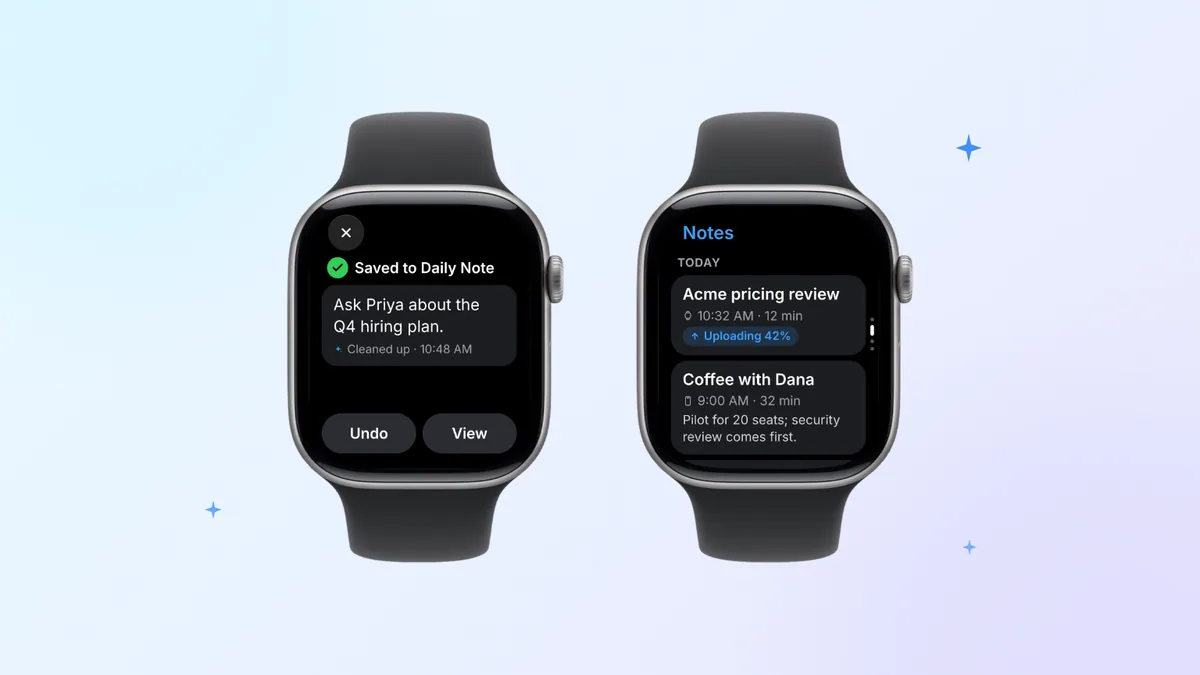
Laxis for Apple Watch, from the company behind this blog, is built for conversations you'll have to act on, and comes with the free Laxis app for iPhone. One tap starts recording with the watch's microphone, even with your phone left at your desk; the recording goes up through your iPhone when the phone is close by, and over Wi-Fi or, on watches with cellular, the mobile network when it isn't. When you stop, you get a transcript with speakers, a summary and the action items. For smaller moments there's Jot: tap the pencil, say the thought, and Laxis tidies it up and files it in today's Daily Note. Jot works even when you're offline.
To be clear, Laxis is not a walkie-talkie replacement: it doesn't carry your voice to another person; it turns what you record into notes. Processing happens in the cloud and setup needs the Laxis app on iPhone. On Basic, the free plan, you get 300 minutes each month across recording, dictation and live translation, each recording is capped at 45 minutes (Premium raises that cap to 2 hours, Business to 4), and notes past 30 days are archived, not erased. Ask Laxis (questions across your notes) is Premium, and Laxis is not HIPAA compliant, with no BAA available. The Laxis for Apple Watch page has screens and setup, and our comparison of Apple Watch voice recorder apps sets it against Voice Memos and others.
Recording people is different from chatting with them, so ask before you start; some places require everyone's consent. Our guide to recording consent laws covers the US state by state; treat it as a starting point, not legal advice.
Need the words, not just the voice?
Install Laxis on iPhone, add it to your watch in the Watch app, and your next recorded conversation comes back as notes with action items.
Get Laxis Free Basic plan, 300 minutes a month.
The bottom line
Walkie-Talkie depended on both people keeping it on, and watchOS 27 ends it for each pair the moment one of them updates. Instead of hunting for a perfect copy, agree on a habit with the people you used to buzz: FaceTime audio when it can't wait, a voice message when it can.
And if the update has you rethinking the rest of your wrist, our guide to Apple Watch apps worth keeping in 2026 groups 22 of them by job.
Keep a record of the conversations that matter. Laxis for Apple Watch records with one tap and hands you a transcript, a summary and action items. It won't replace Walkie-Talkie, and it isn't trying to. 14-day Premium trial, no credit card. Download Laxis
Frequently asked questions
Is Walkie-Talkie gone from Apple Watch?
Yes, Apple discontinued Walkie-Talkie with watchOS 27. Installing watchOS 27 removes the app from your watch, and Apple says it is not available to download from the App Store. Watches that stay on watchOS 26 or earlier keep Walkie-Talkie, but they can only start conversations with friends whose watches have not updated either.
Can I still use Walkie-Talkie on watchOS 26?
Yes, Walkie-Talkie still works on watchOS 26 and earlier, as long as the person you talk to is also on watchOS 26 or earlier. Apple says a watch on watchOS 26 cannot start a conversation with a friend who has updated to watchOS 27. Series 6 to 8, Apple Watch SE (2nd generation) and first-generation Apple Watch Ultra cannot install watchOS 27, so they keep the app.
How far does Apple Watch Walkie-Talkie work?
Apple Watch Walkie-Talkie has no fixed range, because it is not a radio. Apple says both people need a connection through a Bluetooth link to iPhone, Wi-Fi or cellular, and MacRumors notes it runs on FaceTime infrastructure, so it works across a street or across the world while both watches are online. With no connection, it fails even a few feet apart.
Does Walkie-Talkie on Apple Watch cost money?
Walkie-Talkie on Apple Watch costs nothing extra: it is built into watchOS 26 and earlier, and Apple lists no fee for it. It sends your voice over the connection you already have, so you pay only for data. Apple notes that FaceTime data rates may apply on cellular, and a cellular Apple Watch needs its own plan from the same carrier as your iPhone.
Why is Walkie-Talkie not working on my Apple Watch?
The most common reason Walkie-Talkie stops working now is that you or your friend installed watchOS 27, which removes the app and blocks conversations with watches still on watchOS 26. If you are both on watchOS 26 or earlier, check that the invitation was accepted, that your friend is available and not in Theater Mode, and that FaceTime is on and signed in on each iPhone, then restart everything.
What can I use instead of Walkie-Talkie on Apple Watch?
The closest replacements for Walkie-Talkie on Apple Watch are FaceTime audio calls for live talk and voice messages for quick notes: audio clips in Messages, or voice messages in WhatsApp and LINE, which both have watch apps. At home, Intercom in the Home app reaches HomePod speakers. We could not verify any third-party app that offers live push-to-talk on the watch.
Related Product
Laxis Meeting Assistant
Automate your notes today.
- Bot-free notes for Zoom, Google Meet, Teams and in-person meetings
- AI summaries, action items and follow-ups in 100+ languages
- Mac, Windows, iPhone and Android, with a free plan
Start for free, no credit card required.
Learn More ▷