Best Apple Watch Apps in 2026: 22 Picks by Category

The best Apple Watch apps do one job in the few seconds you're willing to hold your arm up: start a run, tick off a task, pay for coffee. Most of the App Store doesn't clear that bar, and this year some familiar names walked away. Philips Hue's listing no longer shows a watch app, Shazam's job now belongs to a built-in Music Recognition app, and watchOS 27 retired Walkie-Talkie altogether. Here are 22 apps for Apple Watch that still earn their spot, grouped by job, with prices and watchOS requirements checked on November 3, 2026. One disclosure before you scroll: one of the 22 comes from Laxis, the company behind this blog.
Quick picks
- What's on your calendar next: Fantastical.
- In-person meetings you'll need to act on: Laxis for Apple Watch.
- Catching a thought: Drafts for text, Just Press Record for audio.
- To-dos: Things 3 if everything you own is Apple, Todoist if it isn't.
- Training and sleep: Gentler Streak, then AutoSleep overnight.
- Runs, rides and trails: Strava, or WorkOutDoors when you want a real map.
- Golf, flights and weather: 18Birdies, Flighty and CARROT Weather.
- Chats and music: WhatsApp, plus Spotify if you pay for Premium.
- Free and already installed: Home, Wallet, Translate, Music Recognition, Find My, Noise and Camera Remote.
How we picked, and what we left out
We didn't run lab tests or wear a stack of watches for a month. Every third-party pick lists Apple Watch under Compatibility on its US App Store page as of November 3, 2026, and the watchOS minimum and price come from that page. What each watch app does comes from the listing or the developer's help pages; Apple's apps are checked against the watchOS 27 Apple Watch User Guide. Anything we couldn't confirm was cut, including some big names:
- Philips Hue and Shazam: their current listings show iPhone and iPad, with no Apple Watch app.
- Microsoft Outlook, YNAB and Citymapper: the listings still show a watch app, but we couldn't find current documentation of what it does.
- Watchsmith: its last update with new features is from March 2023.
Almost every third-party app here needs its iPhone app for setup; the table below shows which keep working once your phone is out of range.
Meetings and productivity
1. Fantastical: what's next, with the forecast
watchOS 10.6 or later · Free app; the watch app is part of Flexibits Premium, $6.99 a month or $56.99 a year
Fantastical's listing files its Apple Watch app, with Up Next and weather, under Flexibits Premium, and says it works over LTE. That's the appeal: lift your wrist and see what's coming without reaching for your phone. Premium also brings meeting polls and Zoom, Google Meet, Webex and Teams calls attached to events. The free tier covers basic events, tasks and a three-day forecast, and a 14-day Premium trial lets you judge the watch side before paying.
2. Laxis for Apple Watch: meetings in the room, turned into notes and action items
watchOS 10 or later · Free Basic plan; Premium $15.99 a month or $119.99 a year in the App Store · Setup happens in Laxis on iPhone
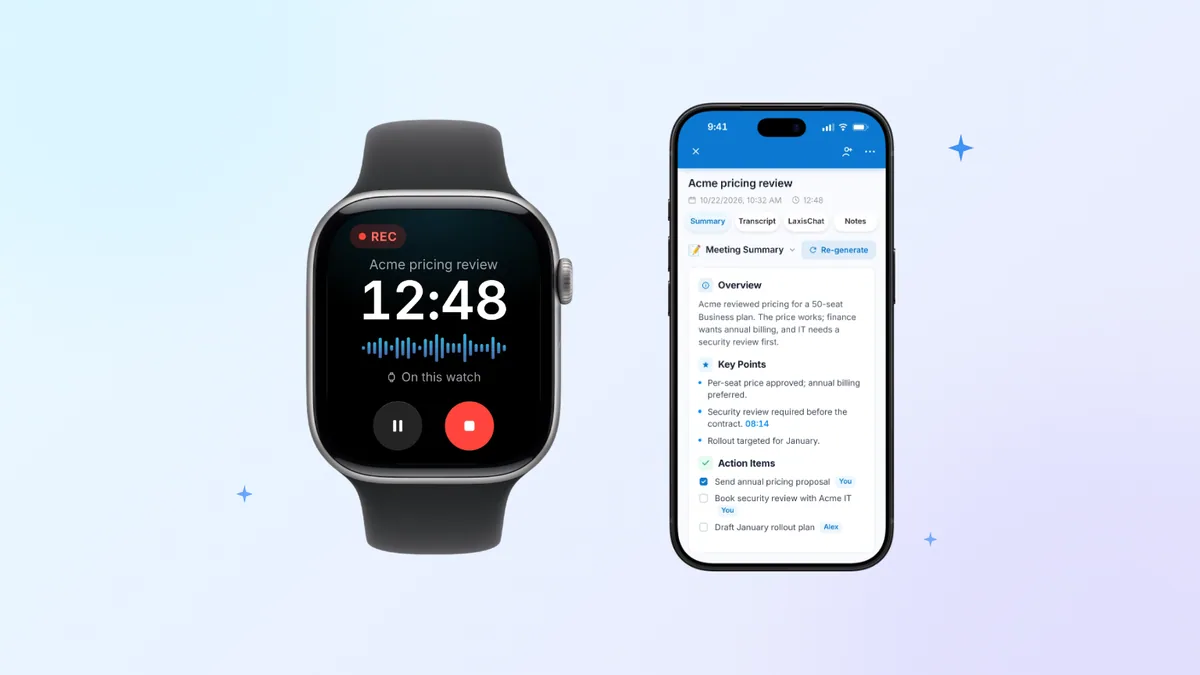
Laxis for Apple Watch isn't a separate download: it ships inside the free Laxis app for iPhone (Laxis: AI Notes & Dictation in the App Store). Sign in on your phone, switch it on in the Watch app, and a single tap starts capturing audio from the watch's built-in microphone, with a wrist tap to confirm. A watch-face complication puts the record button beside the clock, and Double Tap works too on Series 9, Ultra 2 and later with watchOS 11 or later. The watch also shows your next meeting; record from there and the notes land under it.
Your phone can stay in your bag. The audio stays on the watch until it can leave: via your iPhone if the phone is nearby, otherwise over Wi-Fi or, on cellular models, a mobile connection. When you stop, Laxis produces a speaker-labeled transcript, a short summary and the action items, sends a notification, and files it all beside your online meeting notes from Zoom, Teams and Google Meet. The wrist also gets Notes; Tasks, where you check off action items or dictate new ones; Ask Laxis for questions across your meetings, with answers it can read aloud; and Jot, which files a quick spoken idea in today's Daily Note and works even offline.
The trade-offs are real. Processing happens in the cloud, so a watch recording gets its transcript only once the audio has uploaded, and setup needs your iPhone. Basic gives 300 minutes a month, shared with dictation and live translation, and stops any one recording at the 45-minute mark (Premium stretches that to two hours, Business to four); your wrist gets a tap with 10 minutes left and another with 5. Ask Laxis needs Premium. HIPAA-covered work is out, since Laxis isn't HIPAA compliant and offers no BAA, and the watch app only arrived in October, so its track record is short. Screenshots and setup steps are collected in the Laxis for Apple Watch overview.
One more thing about any wrist recorder: people may not notice it, so say you're recording before you start. Consent laws vary from state to state and between countries, and our state-by-state recording consent guide sets out the US rules; none of this is legal advice.
If decisions from in-person meetings keep going missing because nobody wrote them down, download Laxis and try it on the next one.
Notes and voice capture
3. Drafts: say it now, sort it out later
watchOS 9.0 or later · Free to use; Pro costs $24.99 a year or $2.99 monthly
Drafts treats the watch as an inbox for words. Its listing says you can capture text on the watch with nothing but your voice, and it's waiting on your iPhone, iPad and Mac when you sit down. From there, actions send it to Reminders, a message, Dropbox and many other places. The app stays free to use; Pro adds custom actions, themes and workspaces. Its privacy label lists only purchase history, not linked to you.
4. Just Press Record: audio on the wrist, paid for once
watchOS 10.6 or later · $6.99 one-time purchase · Records away from iPhone, transfers later
For audio, Just Press Record is a one-time purchase whose watch app records with your iPhone out of range, starts from a complication and has no length limit. Recordings move to your iPhone for transcription in more than 30 languages and sync through iCloud, and on watchOS 11 or later Double Tap starts and stops them. The privacy label says no data is collected. It goes up against AI note takers and Voice Memos in our Apple Watch voice recorder comparison, and Apple's own options are in how to record audio on Apple Watch.
To-dos
5. Things 3: today's list, dictated and checked off
watchOS 9.1 or later · $9.99 once for iPhone and Apple Watch (Mac and iPad sold separately)
Things keeps its watch app small on purpose. Raise your wrist to see the Today list, check items off as you go and dictate new ones, and the changes sync to iPhone, iPad and Mac through the free Things Cloud. There's no subscription; you pay once per platform. It's already updated for watchOS 27 and is an App Store Editors' Choice.
6. Todoist: free, and not tied to Apple
watchOS 10.0 or later · Free; Pro $6.99 a month or $59.99 a year
Todoist's listing promises you can capture ideas from your Apple Watch and have them sync instantly to iPhone, iPad, Mac and every other device or browser you use. That reach is the reason to choose it over Things: a shared project still works when some of your devices aren't Apple's. The free plan covers the basics, and Pro has a 7-day trial.
Health, fitness and sleep
7. Gentler Streak: training that knows when to ease off
watchOS 9.0 or later · Free; Premium $8.99 a month or $39.99 a year
Gentler Streak, Apple Watch App of the Year in 2022 and a 2024 Apple Design Award winner, sells consistency over intensity. During a workout the watch shows training effects and heart-rate zones, plus a countdown before you tip into overreaching, and daily suggestions on the watch scale a session up or down to match your readiness. It logs more than 140 activity types, and the developer says health data stays on the device through HealthKit. It isn't a medical device, and says so.
8. AutoSleep: sleep tracking with nothing to press
watchOS 9.0 or later, Series 4 or later · $9.99 once, no subscription
Apple's Sleep app now gives you a sleep score, so try it first. AutoSleep is for people who want more: wear the watch to bed and it works out when you slept, rates the night and fills rings for quality, deep sleep and REM. It can also read Apple's sleep stages, and the watch app adds a smart alarm that aims to wake you during lighter sleep. The listing promises no data upload and no in-app purchases, and its privacy label reads Data Not Collected.
Running, cycling and the outdoors
9. Strava: leave the phone at home
watchOS 10.0 or later · Free; subscription $11.99 a month or $79.99 a year · Records without iPhone on Series 4 or later
Strava's help center says the watch app records on Series 4 or later without your iPhone, then uploads when your phone is nearby again or the watch can get online. On your wrist you get pace or speed, heart rate, live elevation for hikes and rides, saved routes on a map with off-route alerts, and Live Segments. The free tier records and shares; the subscription adds deeper training tools.
10. WorkOutDoors: proper maps on a small screen
watchOS 9.2 or later, Series 4 or later · $8.99 once (in-app purchases are optional tips) · Works without iPhone
WorkOutDoors is for hikers and trail runners who want a map rather than a column of numbers. It uses OpenStreetMap, trails included, with maps you can pan, zoom and store on the watch for offline use. Newer versions add turn-by-turn navigation and waypoints, the listing says your iPhone can stay home, and finished sessions can go straight to Strava. It bills itself as the most configurable workout app for Apple Watch, so budget an evening for settings.
Golf
11. 18Birdies: yardages and scoring with the phone in your bag
watchOS 10.0 or later · Free; Premium optional
18Birdies puts distances, scoring and shot tracking on Apple Watch in its free tier, so your phone can sit in the bag while you check the yardage to the green on more than 45,000 courses. Premium adds plays-like distances, club recommendations, 3D green maps and automatic swing detection. The listing shows 306,000 ratings averaging 4.9.
Travel and weather
12. Flighty: flight tracking, watch app included free
watchOS 11.0 or later · Free; Pro $9.99 a month or $59.99 a year
Flighty's free tier, according to its listing, includes unlimited flights, live data and its Apple Watch app, with no ads. Pro adds watch-face complications, delay predictions, Live Activities and calendar or TripIt sync, and it's free on your first flight. The listing doesn't detail the watch screens, so treat the watch as a companion to the phone app. It needs watchOS 11, the strictest requirement here. Once you land, Apple's built-in Maps gives directions on the watch, offline maps included.
13. CARROT Weather: forecasts with an attitude
watchOS 9.0 or later · Free; Premium $4.99 a month or $19.99 a year
CARROT wraps detailed forecasts in a sarcastic robot whose personality you pick, from straitlaced to profane. The watch app shows current conditions and an hourly forecast. Premium adds watch-face complications with background updates, weather alerts, and Live Activities on the watch that show when rain will start or stop.
Messaging, music and podcasts
14. WhatsApp: a full watch app at last
watchOS 10 or later, Series 4 or later · Free
WhatsApp's Apple Watch app arrived in November 2025 and does more than mirror notifications. According to WhatsApp, you can read full messages, scroll further back in a chat, see who's calling, react with emoji, view images and stickers, and record and send voice messages, with chats still end-to-end encrypted. Typed replies go through the watch's own dictation; when it won't cooperate, try these fixes for Apple Watch dictation.
15. Spotify: offline playlists, if you pay
watchOS 10 or later, Series 4 or later · Free app; playing from the watch needs Spotify Premium
Spotify's watch app is a remote for everyone, but only Premium subscribers can play from the watch. With Premium you can download playlists and podcasts (at least 10 hours, depending on the model, Spotify says) or stream over Wi-Fi or cellular, as long as Bluetooth headphones are paired to the watch. Free listeners can still control what's playing on a phone or speaker.
Built-in apps people overlook
Seven of the most useful apps for Apple Watch come preinstalled and free. All are in Apple's watchOS 27 user guide, and a deleted one can be downloaded again from the App Store.
16 and 17. Home and Wallet: lights, locks, cards and passes
With the Philips Hue watch app gone, Home is how you run lights, locks and scenes from your wrist, including Hue lights you've added to Apple Home. Wallet holds your cards and passes, so Apple Pay, boarding passes and tickets come along without your phone in hand.
18 and 19. Translate and Music Recognition: one for trips, one for bars
Translate handles text and speech on the wrist and lets you download languages for use offline. Music Recognition is Shazam built into watchOS: tap it while a song plays and it names the track.
20 to 22. Find My, Noise and Camera Remote: small tools that save the day
watchOS 27 folds people, devices and items into one Find My app. Noise measures how loud it is around you without recording or saving any sound, and can warn you past a threshold you set. Camera Remote turns the watch into a viewfinder and shutter for your iPhone camera, within normal Bluetooth range of about 33 feet. Series 12 and Ultra 4 owners also have Siri Recap coming; here's what Siri Recap and Live Rewind do.
And one that's gone: Walkie-Talkie
If you came looking for Walkie-Talkie on Apple Watch, it's no longer there. Apple says Walkie-Talkie was discontinued with watchOS 27: the app disappears when you update and can't be downloaded again, and watches still on watchOS 26 can't start a conversation with friends who have updated. The closest substitutes are WhatsApp voice messages or a FaceTime audio call from the watch, and our Walkie-Talkie guide covers who can still use it and what else works.
All 22 side by side
| App | Category | Away from iPhone? | Price | watchOS |
|---|---|---|---|---|
| Fantastical | Calendar | Works over LTE, per listing (Premium) | Free; Premium $6.99/mo | 10.6+ |
| Laxis for Apple Watch | Meetings | Records and uploads over Wi-Fi or cellular; set up on iPhone | Free Basic; Premium $15.99/mo | 10.0+ |
| Drafts | Text capture | Not stated; syncs to iPhone, iPad, Mac | Free; Pro $2.99/mo | 9.0+ |
| Just Press Record | Audio capture | Yes, transfers later | $6.99 once | 10.6+ |
| Things 3 | To-dos | Not stated | $9.99 once | 9.1+ |
| Todoist | To-dos | Not stated | Free; Pro $6.99/mo | 10.0+ |
| Gentler Streak | Fitness | Not stated | Free; Premium $8.99/mo | 9.0+ |
| AutoSleep | Sleep | Tracks on the watch; analysis on iPhone | $9.99 once | 9.0+ |
| Strava | Running, cycling | Yes, Series 4 or later | Free; $11.99/mo | 10.0+ |
| WorkOutDoors | Outdoor maps | Yes, per listing | $8.99 once | 9.2+ |
| 18Birdies | Golf | Phone can stay in your bag | Free; Premium optional | 10.0+ |
| Flighty | Flights | Not stated | Free; Pro $9.99/mo | 11.0+ |
| CARROT Weather | Weather | Not stated | Free; Premium $4.99/mo | 9.0+ |
| Messaging | Not stated | Free | 10.0+ | |
| Spotify | Music, podcasts | Yes with Premium, headphones and Wi-Fi or cellular | Free app; Premium to play on the watch | 10.0+ |
| Home | Smart home | Varies by feature | Included | Built in |
| Wallet | Payments, passes | Varies by feature | Included | Built in |
| Translate | Travel | Downloaded languages work offline | Included | Built in |
| Music Recognition | Utility | Varies by feature | Included | Built in |
| Find My | Utility | Varies by feature | Included | Built in |
| Noise | Utility | Measures on the watch | Included | Built in |
| Camera Remote | Utility | Needs iPhone within about 33 feet | Included | Built in |
From US App Store listings, developer help pages and Apple's watchOS 27 user guide, checked November 3, 2026.
How to add, delete and close apps on Apple Watch
Add apps. Many watch apps install themselves along with their iPhone version. If one doesn't, open the Watch app on your iPhone and look under Available Apps, or press the Digital Crown, open the App Store on the watch, search and tap Get or the price.
Delete apps. On watchOS 27, press the Digital Crown, swipe up to see all your apps, touch and hold until the icons jiggle, then tap the delete button and confirm with Delete App. On iPhone, go to the Watch app's My Watch tab, choose Apps, pick the app and switch off Show App on Apple Watch. Deleting an app from iPhone removes its watch app too, and some built-in apps can't be deleted.
Close apps. Apple says there's usually no reason to quit an app, and doing so doesn't save battery. If one freezes, open it, keep the side button pressed until you see the sliders, then keep the Digital Crown pressed until the watch face returns.
Bring your next in-person meeting back as notes. Install the free Laxis app on iPhone, put it on your watch through the Watch app, and your next conversation in the room comes back as a transcript, a summary and action items. 14-day Premium trial, no credit card. Download Laxis
The bottom line
A watch gets more useful the less you ask of it. Keep one app for each job you really do on your wrist, delete the rest, and look again after every watchOS update; this year showed that even household names can drop their watch apps.
Frequently asked questions
What are the best apps for Apple Watch?
The best apps for Apple Watch depend on what you use it for, but strong 2026 picks include Strava and WorkOutDoors for workouts, AutoSleep for sleep, Things 3 or Todoist for tasks, Fantastical for your calendar, plus CARROT Weather, Flighty, WhatsApp, Spotify and 18Birdies. For in-person meetings, Laxis for Apple Watch turns recordings into notes. Built-in apps like Translate and Wallet are worth keeping too.
What are the best free Apple Watch apps?
Many good Apple Watch apps are free to start, including Todoist, Drafts, Strava, Gentler Streak, CARROT Weather, Flighty, WhatsApp and 18Birdies, and Laxis Basic includes 300 minutes a month. Apple's built-in Translate, Music Recognition, Home, Wallet, Find My and Noise apps cost nothing. Spotify's watch app is free too, but playing music from the watch itself needs Premium.
How do I add apps to my Apple Watch?
You can add apps to Apple Watch from the watch or from your iPhone. On the watch, press the Digital Crown, open the App Store, search for the app and tap Get or the price. On iPhone, open the Watch app and install it from Available Apps. Many apps also add their watch version automatically when you install them on iPhone.
How do I delete apps on Apple Watch?
To delete an app on Apple Watch with watchOS 27, press the Digital Crown, swipe up to see all apps, touch and hold until the icons jiggle, then tap the delete button and confirm with Delete App. On iPhone, you can instead go to the Watch app's My Watch tab, choose Apps, pick the app and switch off Show App on Apple Watch. Some built-in apps can't be removed.
How do you close apps on Apple Watch?
You rarely need to close apps on Apple Watch, and Apple says quitting one doesn't save battery. If an app freezes, open it, keep the side button pressed until you see the sliders, then keep the Digital Crown pressed until the watch face returns. That closes the app, and you can reopen it from the app grid.
What happened to Walkie-Talkie on Apple Watch?
Apple discontinued Walkie-Talkie with watchOS 27. After you update, the app no longer appears on the watch and can't be downloaded from the App Store, and watches still on watchOS 26 can't start a Walkie-Talkie conversation with friends who have updated. For quick voice chats, WhatsApp's watch app can record and send voice messages, or you can make a FaceTime audio call from the watch.
Related Product
Laxis Meeting Assistant
Automate your notes today.
- Bot-free notes for Zoom, Google Meet, Teams and in-person meetings
- AI summaries, action items and follow-ups in 100+ languages
- Mac, Windows, iPhone and Android, with a free plan
Start for free, no credit card required.
Learn More ▷