Notes on Apple Watch: How to Take, Read and Sync Notes
Yes, you can keep notes on Apple Watch. Since watchOS 26, the watch has a Notes app of its own: it shows the notes you store in iCloud, starts a new one when you dictate, scribble or type, and syncs it all to your iPhone, iPad and Mac. The one thing it won't do is change a note that already exists. That job still belongs to a bigger screen.
Below: the steps, what Notes on Apple Watch can't do, fixes for notes that never show up, and the apps that fill the gaps, including an AI note taker for meetings.
Which watches have Notes, and why old answers say none do
For years the honest answer to "is there a notes app on Apple Watch?" was no, and plenty of older articles still say so. That changed with watchOS 26. When Apple previewed it in June 2025, it described a Notes app that could pin notes, open locked ones, complete checklist items and create notes with Siri, dictation or the keyboard. It's built into watchOS, so there's nothing to install.
The catch is hardware. Apple released watchOS 26 for Apple Watch Series 6 and later, Apple Watch SE (2nd generation) and every Apple Watch Ultra, paired with iPhone 11 or later on iOS 26. On a Series 4, a Series 5 or a first-generation SE there's no Notes app, so notes on that wrist mean a third-party app.
How to take a note on Apple Watch
- Open Notes. Press the Digital Crown to bring up your apps, then tap Notes.
- Start a note. Tap the New Note button.
- Pick an input method. The input button in the lower-right corner of the text screen shows how the watch will take your words. Tap it to switch between dictation, Scribble (letters drawn with a fingertip) and the onscreen keyboard. Apple notes that the keyboard is missing in some languages and on Apple Watch SE 3.
- Write it. Speak, draw or type. Punctuation such as "comma" or "question mark" can be dictated.
- Save it. Tap Done. The note joins your iCloud notes and appears on iPhone and on any other device using the same Apple Account.
Two shortcuts: ask Siri to "start a new note," the phrase Apple's watchOS 26 guide suggests, or, when a note runs long, finish typing on your iPhone by tapping the notification for Apple Watch Keyboard Input that appears when it's nearby. For dictation quirks and the "dictation failed" error, see our guide to dictating on Apple Watch.
Checklist tip: build shopping and packing lists as checklists on iPhone. Apple's watchOS 26 guide says a tap marks an item complete on the watch, and the change syncs through iCloud, even though the rest of the note stays read-only on the wrist.
Reading, pinning and deleting notes
Open Notes and turn the Digital Crown to scroll. Pinned notes stay at the top and the rest follow, newest first; on watchOS 26, an Expand button jumps back through months and years. Tap a note to read it, though Apple says some formatting and certain attachments, tables and audio recordings among them, don't show on the watch.
To keep a note handy, swipe right on it and tap the Pin button. To remove one, swipe left and tap Delete. Deleting isn't final: the note waits in Recently Deleted for 30 days, and you restore it from iPhone by opening Notes, going to Recently Deleted, swiping left on the note, tapping Move and choosing a folder.
What you can't do in Notes on Apple Watch
Think of the watch app as a reader with a quick-capture button, not an editor. Going by Apple's guides, the work splits like this:
| What you want to do | On Apple Watch | On iPhone, iPad or Mac |
|---|---|---|
| Create a new note | Yes, by dictation, Scribble, keyboard or Siri | Yes |
| Read iCloud notes | Yes, pinned first, then newest | Yes |
| Pin or delete a note | Yes, with a swipe right or left | Yes |
| Tick a checklist item | Yes, per Apple's watchOS 26 guide | Yes |
| Edit an existing note | No | Yes, and the changes sync through iCloud |
| See tables, audio recordings, some formatting | No | Yes |
| Recover a deleted note | No | Yes, from Recently Deleted within 30 days |
| Show notes kept On My iPhone, in Gmail or in Yahoo | Not described: Apple's guide covers iCloud notes | Yes, inside their own account |
The editing gap is the one that catches people out. Adding a note takes seconds, but a typo or one more line for yesterday's list has to wait for your phone, or go into a fresh note. That's fine for ideas you'll tidy later and a problem for anything that must read cleanly the moment it's saved.
Jot in Laxis for Apple Watch is built for that gap: say the thought, and a cleaned-up version is saved to today's Daily Note. If that's how you take notes, get Laxis free for iPhone, then install it on the watch through the Watch app.
Notes not showing or not syncing on Apple Watch: fixes in order
Missing notes, or a watch note that never reaches your phone, usually come down to where the note is stored or how iCloud is set up. Apple's own fixes start there, and so does this list. Check the watch after each step.
- Confirm the watch can run Notes. Look for watchOS 26 or later under Software Update (Watch app on iPhone: My Watch, General). If your model can't install it, the app will never appear.
- Find out where the note lives. Apple's watch guide says to use iCloud-synced Notes and only describes iCloud notes reaching the wrist. In Notes on iPhone, go back to the Folders list: a note under On My iPhone, Gmail or Yahoo belongs to another account. To move it, tap Edit in its list, select it, tap Move and pick an iCloud folder.
- Turn on Notes in iCloud. In iPhone Settings, tap your name, then iCloud, then Notes, and switch on Sync this iPhone. It's Apple's first fix for iCloud notes that don't appear.
- Use one Apple Account. Notes reach your paired iPhone and whatever else is signed in to your Apple Account; an iPad or Mac on a different account keeps its own set.
- Give it a connection. Apple lists Notes among the apps that keep working when the watch can't reach iPhone, Wi-Fi or cellular, so offline writing and reading are fine, but a new note needs a connection to reach your other devices. Many dictation languages rely on Apple's servers, so offline, Scribble or the keyboard is safer.
- Restart, then update. Turn the watch off and on, restart iPhone, and install the latest software everywhere; Apple's missing-notes article starts with updates on every device.
- Check Recently Deleted. One stray swipe left on the watch deletes a note. It stays in Recently Deleted on iPhone for 30 days.
Quick sync test: create a note on the watch called "sync test," then open Notes on iPhone. If it turns up in an iCloud folder, syncing works, and the notes you're missing are most likely stored in a different account.
Reminders and Voice Memos: the other built-in note takers
Two other Apple apps on the wrist hold onto what you'd otherwise forget, and for some notes they're the better pick.
Reminders, for anything with a next step. Scroll to the bottom of a list and tap Add Reminder. Unlike Notes, Reminders lets you edit on the watch: tap an item, tap Edit, and add a note, date, time, location, tag, flag or priority, or move it to another list. Reminders sync through iCloud, and away from iPhone, Apple lists them among the jobs the watch does over Wi-Fi or cellular.
Voice Memos, for thoughts too long to type. Apple pitches it as a way to record personal notes: tap record, talk, tap stop, and the memo syncs to iPhone, iPad and Mac, where it appears under Watch Recordings, even if you recorded with no connection. It's audio, not text, so you'll listen back or transcribe it later. Our Apple Watch audio recording guide has quicker ways to start, and the fixes for Apple Watch voice memos that won't sync help when a memo never arrives.
Third-party notes apps that still have a watch app
Not every notes app for Apple Watch still has a watch app, so we checked each App Store listing on November 3, 2026:
| App | What it does on the wrist | Needs | Price |
|---|---|---|---|
| Drafts | Captures text by voice; it waits in Drafts on iPhone, iPad and Mac | watchOS 9 or later | Free; Drafts Pro $2.99 a month or $24.99 a year |
| Bear | Dictates text and appends it to recent notes | watchOS 9 or later | Free; Bear Pro $2.99 a month or $29.99 a year, which adds iCloud sync between iPhone, iPad and Mac |
| Microsoft OneNote | Lists Apple Watch as a platform; the listing doesn't say what the watch app does | watchOS 26 or later | Free; Microsoft 365 plans sold in the app |
| Laxis for Apple Watch | Jot saves quick thoughts to a Daily Note; meetings recorded on the wrist become notes, Tasks and Ask Laxis answers | watchOS 10 or later | Free Basic plan; paid plans from $9.99 a month, billed yearly |
Drafts works like an inbox for text: what you say on the watch waits on your other devices, where its actions send it on. Bear fills the hole Apple leaves by appending dictation to a recent note. OneNote names Apple Watch as a platform without describing the watch features, so test it before you depend on it. And Evernote's current listing covers iPhone and iPad only, with no Apple Watch app.
Want audio instead of text? Our comparison of seven Apple Watch voice recorder apps covers them one by one.
An AI note taker on Apple Watch: Jot and meeting notes in Laxis
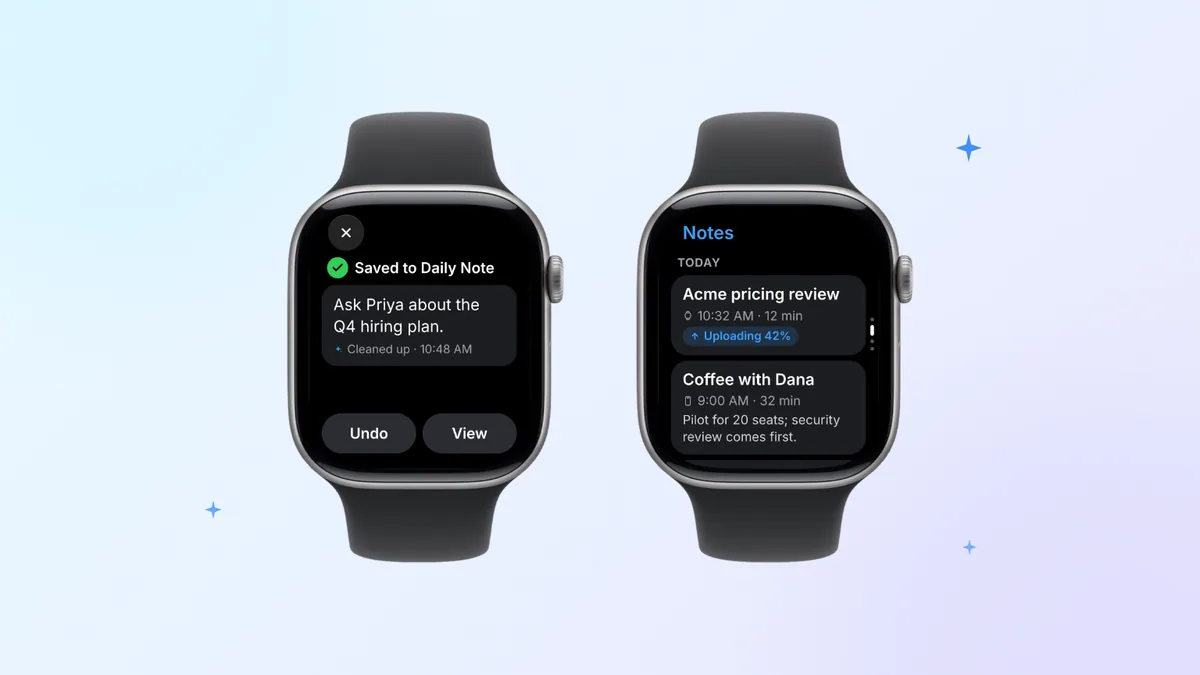
Apple's Notes keeps exactly what you said. Jot is for when that isn't what you want to read later: in Laxis on your wrist, tap the pencil icon and say the thought. Laxis cleans it up and adds it to today's Daily Note, so a day's loose ideas end up in one place, not in a dozen untitled notes. Jot works even when you're offline.
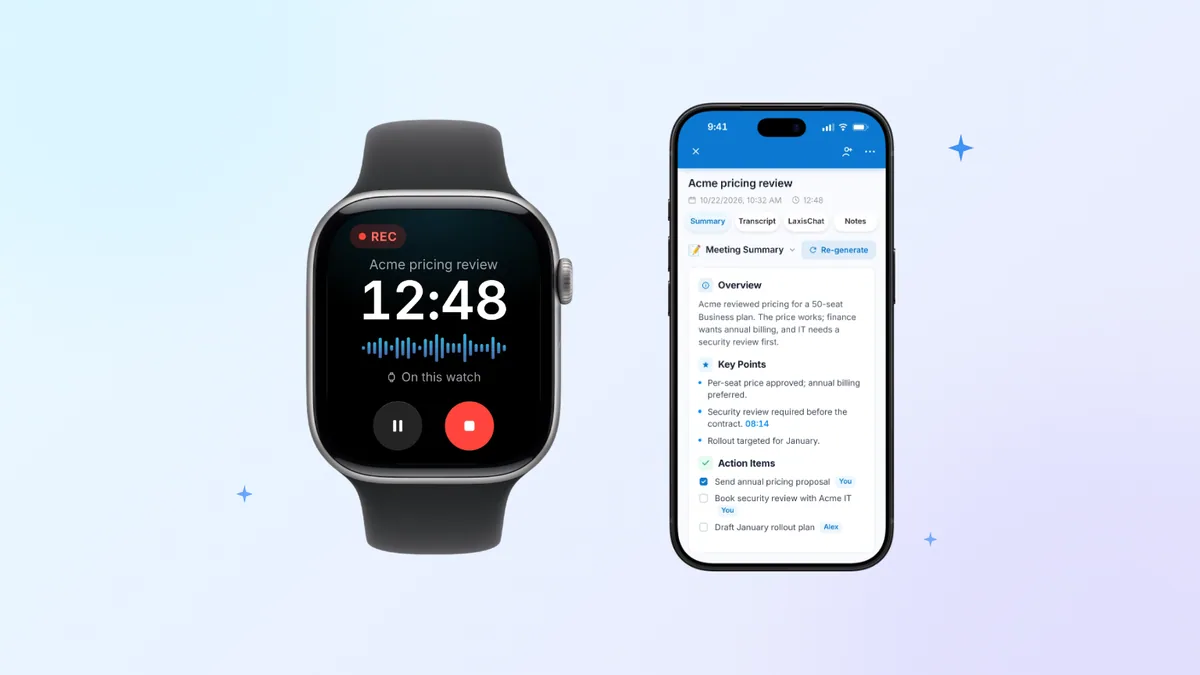
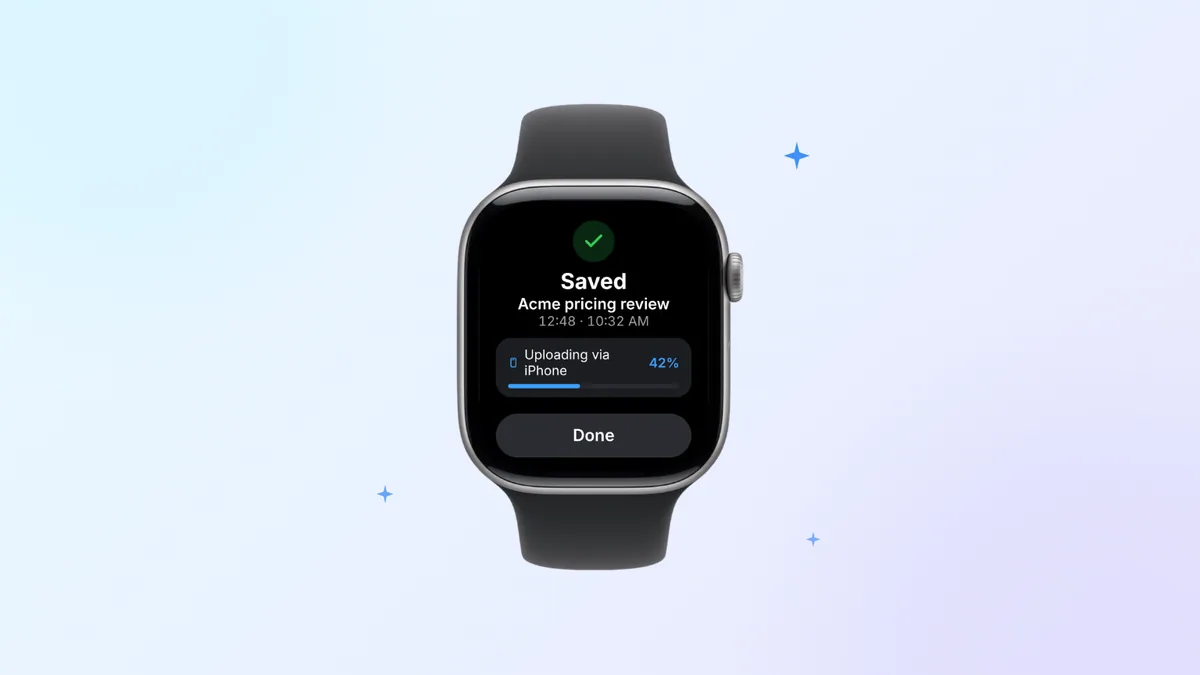
Meeting notes are a different job, and that's where an Apple Watch note taker has to do more than save text. Tap once in Laxis and the watch's own microphone records the meeting while your iPhone stays at your desk. After you tap stop, Laxis produces a transcript that tells speakers apart, a summary and the action items, notifies you when they're ready, and files them with your online calls, so you can open them on iPhone, the desktop apps or the web. On the wrist:
- Notes lists each meeting with a one-line summary and shows new recordings moving from uploading to ready.
- Tasks groups the action items by meeting; tap one to mark it done, or add one by voice.
- Ask Laxis takes a question about anything in your notes, say what you promised a client last week, and replies briefly, on screen or read aloud. It's part of Premium.
The limits: setup happens in the Laxis iPhone app, and the watch app needs watchOS 10 or later. Processing runs in the cloud, so a watch recording turns into text after the upload finishes, never in real time on your wrist. Basic, which costs nothing, comes with 300 minutes a month in one pool shared by recordings, dictation and live translation, recordings capped at 45 minutes each, and 30 days of history (older notes are archived, not deleted). It isn't HIPAA compliant and Laxis doesn't sign BAAs, which rules out patient conversations that need one.
When the notes come from recording other people, tell them before you start. The rules change from one state or country to the next, and in some places everyone being recorded has to agree. That part is your responsibility, not the app's. Our call recording consent guide lists the rules for each US state. That guide is general information rather than legal advice, as is this article.
The product page for Laxis for Apple Watch shows every screen, and our Apple Watch launch post walks through setup.
Start the note on your wrist. Read it anywhere. Install Laxis free on iPhone and the watch app comes with it; add it from the Watch app if it doesn't appear on its own. Then jot down thoughts, record meetings, and check summaries and tasks from your wrist. 14-day Premium trial, no credit card. Try Laxis on your wrist
The bottom line
Notes on Apple Watch finally exist, and for capture they're quick: a new note takes seconds, and your iCloud notes are a scroll away. Treat the watch as the place a note starts and gets read, not where it gets rewritten, and let each app do its part: Reminders for next steps, Voice Memos for long thoughts, Bear for one more line, and an Apple Watch AI note taker when the note is a whole meeting.
Frequently asked questions
Is there a Notes app on Apple Watch?
Yes, Apple Watch has had a built-in Notes app since watchOS 26, which arrived in fall 2025. It shows your iCloud notes and lets you create new ones by dictation, Scribble, the keyboard or Siri, then pin or delete them. It needs Apple Watch Series 6 or later, SE (2nd generation) or later, or any Ultra model. Older watches need a third-party notes app.
How do I get my iPhone notes onto my Apple Watch?
Keep the notes in iCloud and they appear on Apple Watch by themselves. In iPhone Settings, tap your name, then iCloud, then Notes, and check that Sync this iPhone is on. Notes stored On My iPhone or in a Gmail or Yahoo account fall outside what Apple describes, so move them into an iCloud folder. The watch also needs watchOS 26 or later.
Can you edit notes on Apple Watch?
No, Apple Watch cannot change the text of a note that already exists. Apple says to make those edits on iPhone, iPad or Mac, where the changes sync through iCloud. On the watch you can create, pin and delete notes, and the watchOS 26 guide adds ticking off checklist items. If adding a line to a recent note matters, Bear has a watch app that can do it.
Why are my notes not showing on Apple Watch?
Notes stay off Apple Watch when they are not stored in iCloud, when Notes sync is off on iPhone, or when the watch is not on watchOS 26 or later. On iPhone, check that the missing notes sit in an iCloud folder rather than On My iPhone, and that Sync this iPhone is on under iCloud, then Notes. Then restart both devices and install any updates.
Does the Notes app on Apple Watch work without iPhone?
Yes, Apple lists Notes among the apps that still work when Apple Watch has no connection to iPhone, Wi-Fi or cellular, so you can create and read notes offline. A new note reaches your other devices once the watch is connected again. Many dictation languages depend on Apple's servers, so with no signal, Scribble or the keyboard may be the way to write.
How do I take meeting notes on Apple Watch?
To take meeting notes on Apple Watch, record the meeting with an app that turns audio into notes, because typing on the wrist cannot keep up with a conversation. Laxis for Apple Watch starts recording with one tap, then transcribes the meeting, writes a summary and lists action items you can check on the watch. Voice Memos is free but gives you audio only. Tell people before you record.
Related Product
Laxis Meeting Assistant
Automate your notes today.
- Bot-free notes for Zoom, Google Meet, Teams and in-person meetings
- AI summaries, action items and follow-ups in 100+ languages
- Mac, Windows, iPhone and Android, with a free plan
Start for free, no credit card required.
Learn More ▷